✦ AI-Powered Travel Planning

Your next
adventure,
charted.

Plan on a real map with an AI copilot that acts. Forward a booking and it lands in the right trip. Fly with the gate on your lock screen, walk with a guide in your ears, order wine with a sommelier who read the list — and keep the story as badges.

Start Planning — It's Free →
Free to start Web + iPhone, same app Real screens below, not mockups
Start here

Every trip, pinned on a world you can't stop looking at

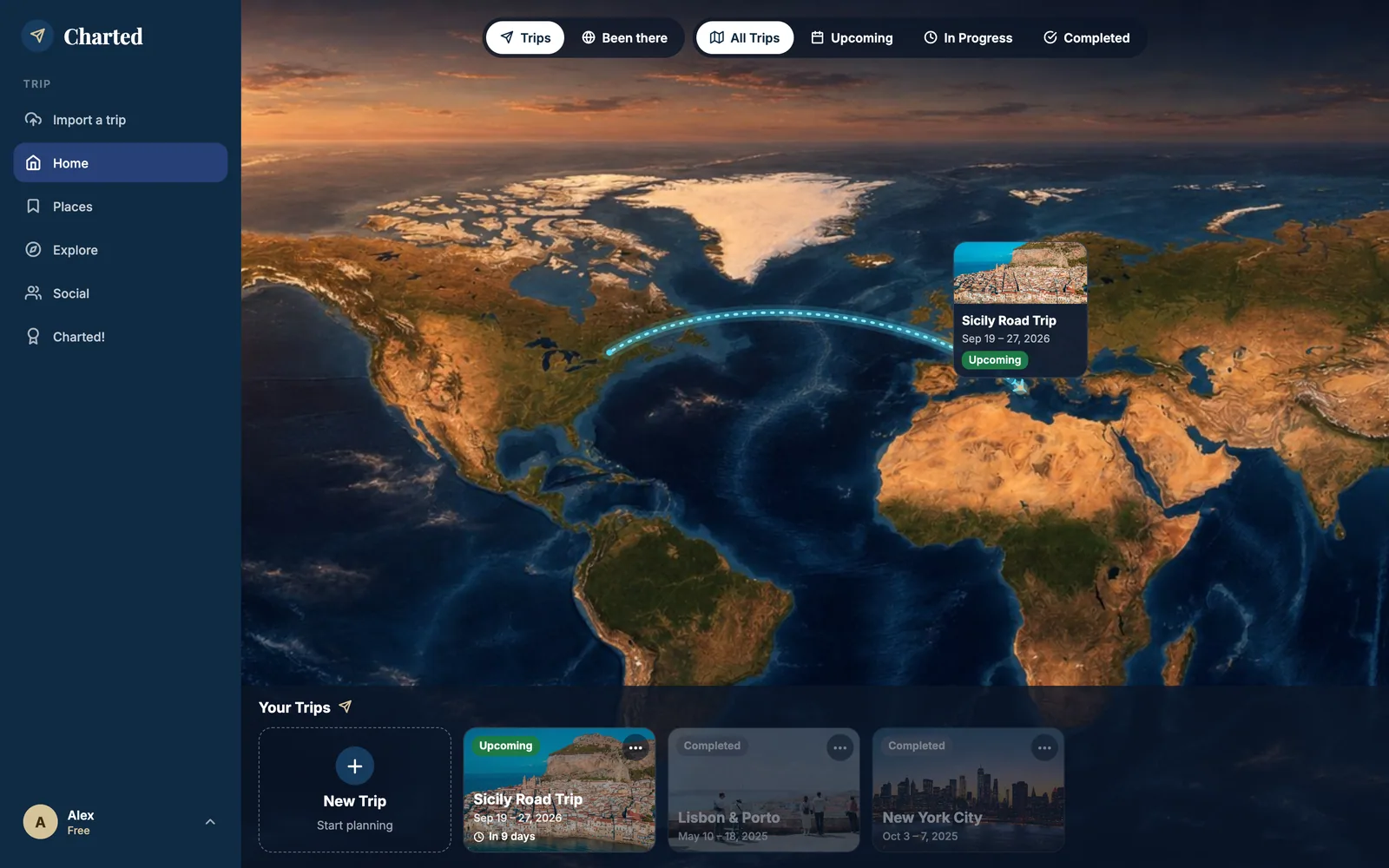
Home is not a list. It's an illustrated world map — eight styles, from Dusk Ocean to Night Lights — where your next trip draws its real flight path from your departure airport, and past trips fade into the map.

Charted home on the web: an illustrated world map in the Dusk Ocean style with a navy sidebar (Import a trip, Home, Places, Explore, Social, Charted!). A dotted flight path arcs from Montréal across the Atlantic to a pinned card 'Sicily Road Trip, Sep 19–27, 2026, Upcoming' over Sicily. Filters read Trips / Been there and All Trips / Upcoming / In Progress / Completed. Below the map, the 'Your Trips' carousel shows a New Trip card and three trips with photos: Sicily Road Trip (in 9 days), Lisbon & Porto and New York City, both completed.
The web home. The path is drawn from the real departure airport of the first flight; the pin is the trip's anchor point.
Plan

A planner that thinks

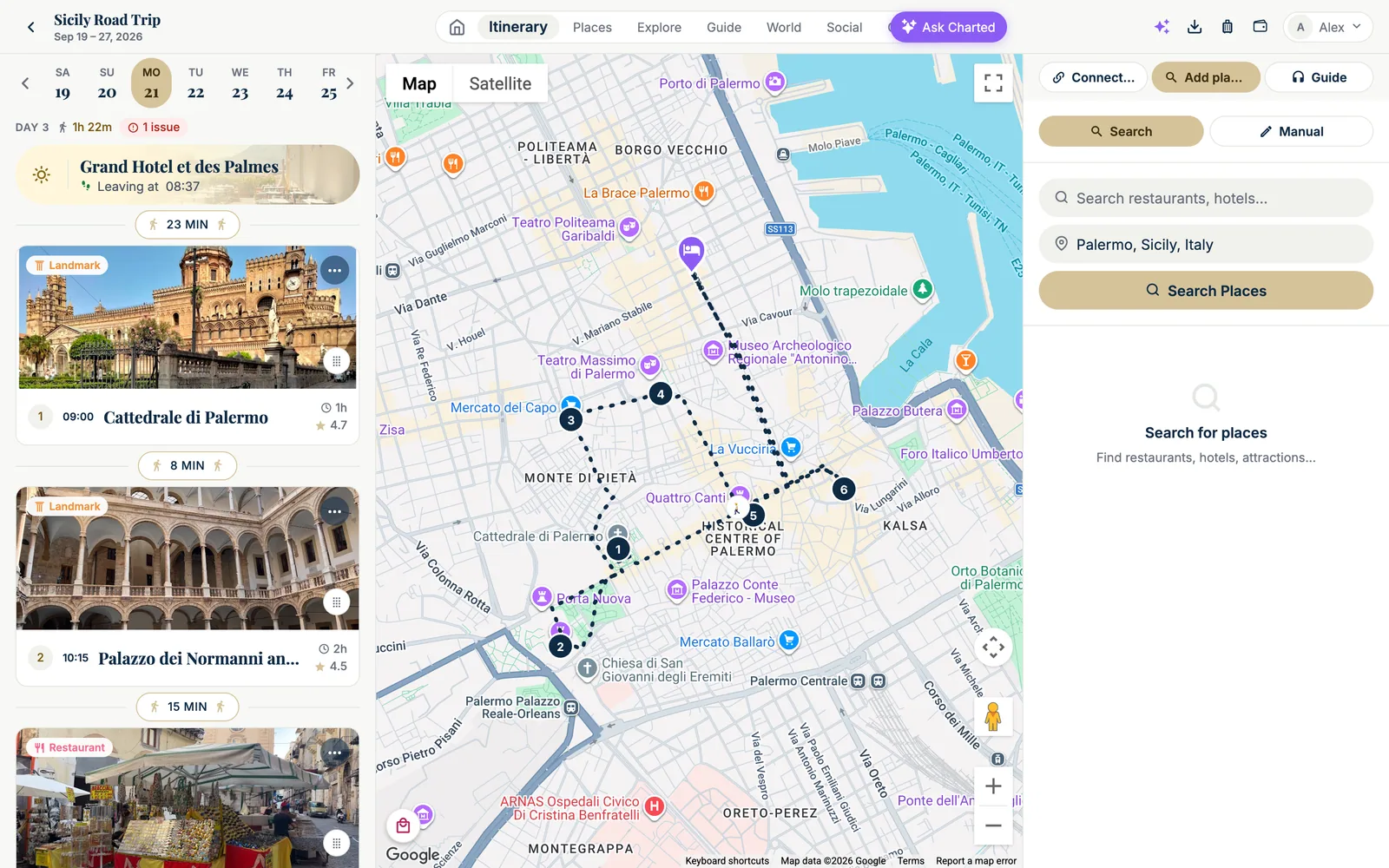
Three columns: your day, a real map, your saved places. Every walk between two stops is measured on the actual streets; the schedule engine keeps the times honest.

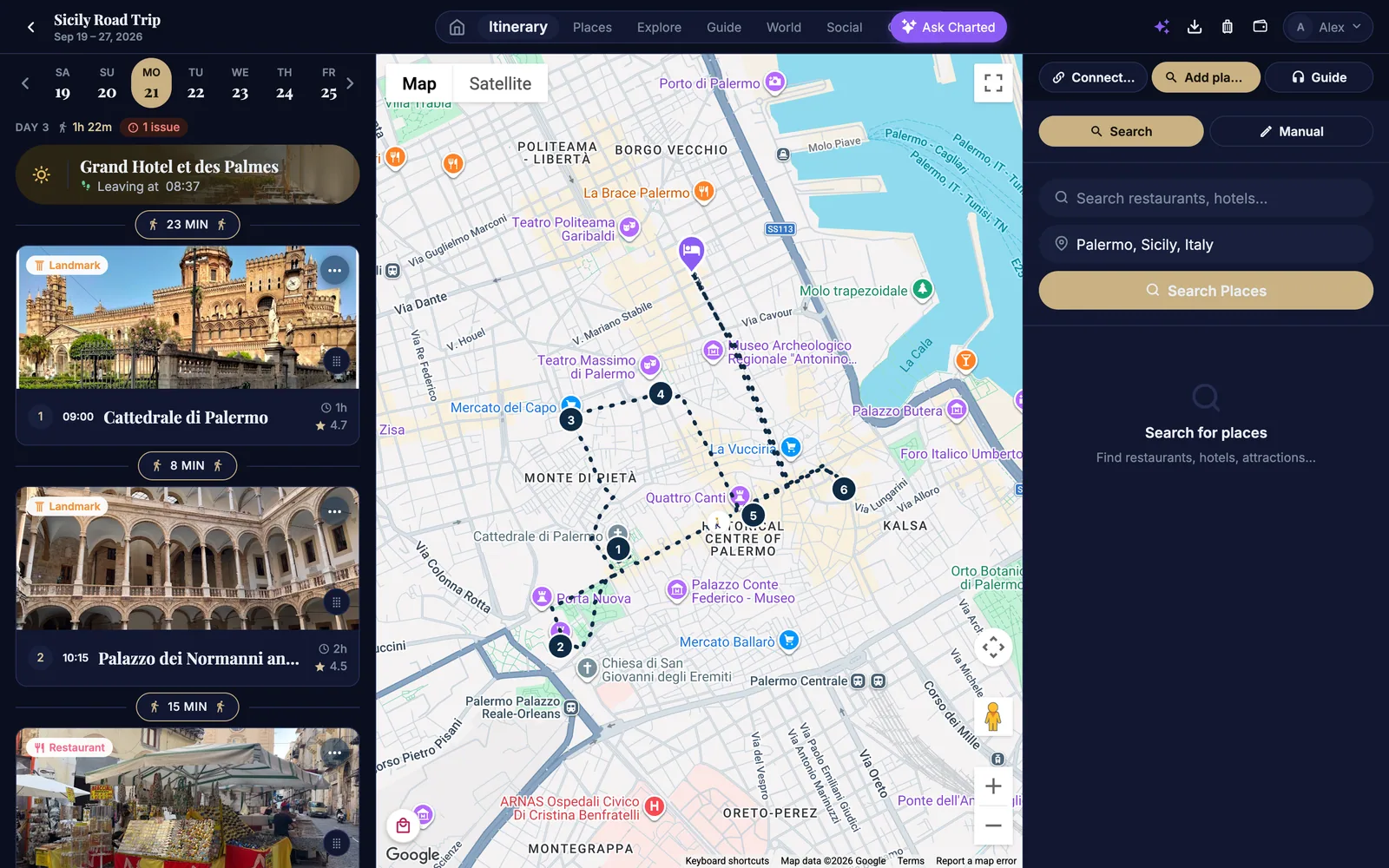
Charted's day planner for Monday, Sep 21 (day 3 of the Sicily Road Trip). Left column: the day strip Sa 19 to Fr 25, 'DAY 3 · 1h 22m · 1 issue', the ghost hotel card 'Grand Hotel et des Palmes — Leaving at 08:37', a '23 MIN' walking pill, stop 1 'Cattedrale di Palermo' at 09:00 with a photo of the cathedral (1 h, 4.7 stars), an '8 MIN' pill, stop 2 'Palazzo dei Normanni' at 10:15 (2 h, 4.5 stars), a '15 MIN' pill and a street-food restaurant card. Middle: a Google map of Palermo with numbered pins 1 to 6 joined by a dotted walking route along the real streets, the hotel marked with a purple bed pin. Right: the 'Add places' panel with a Search / Manual toggle, a search field and the location 'Palermo, Sicily, Italy'.
Day 3 in Palermo: the hotel you're leaving, the walk to each stop, the route drawn on Google Maps.

The day, on the street

Walking times come from Google Routes on the real streets, dotted on the map. Drive, transit or bike when it's too far — automatically, from your own rules.

  • Ghost hotels — where you sleep frames the day: "leaving at 08:37", "back at 22:40", with the route home.
  • A schedule engine — move one stop and only what has to move moves; it warns when a place is closed that day or when you arrive after it closes.
  • Blocks — group an excursion and move the whole block to another day; parking returns, airport transfers and cable cars are understood as two-ended rides.
  • Street View, satellite, tap any place on the map to see its Google card and add it to the day.

One card for every place

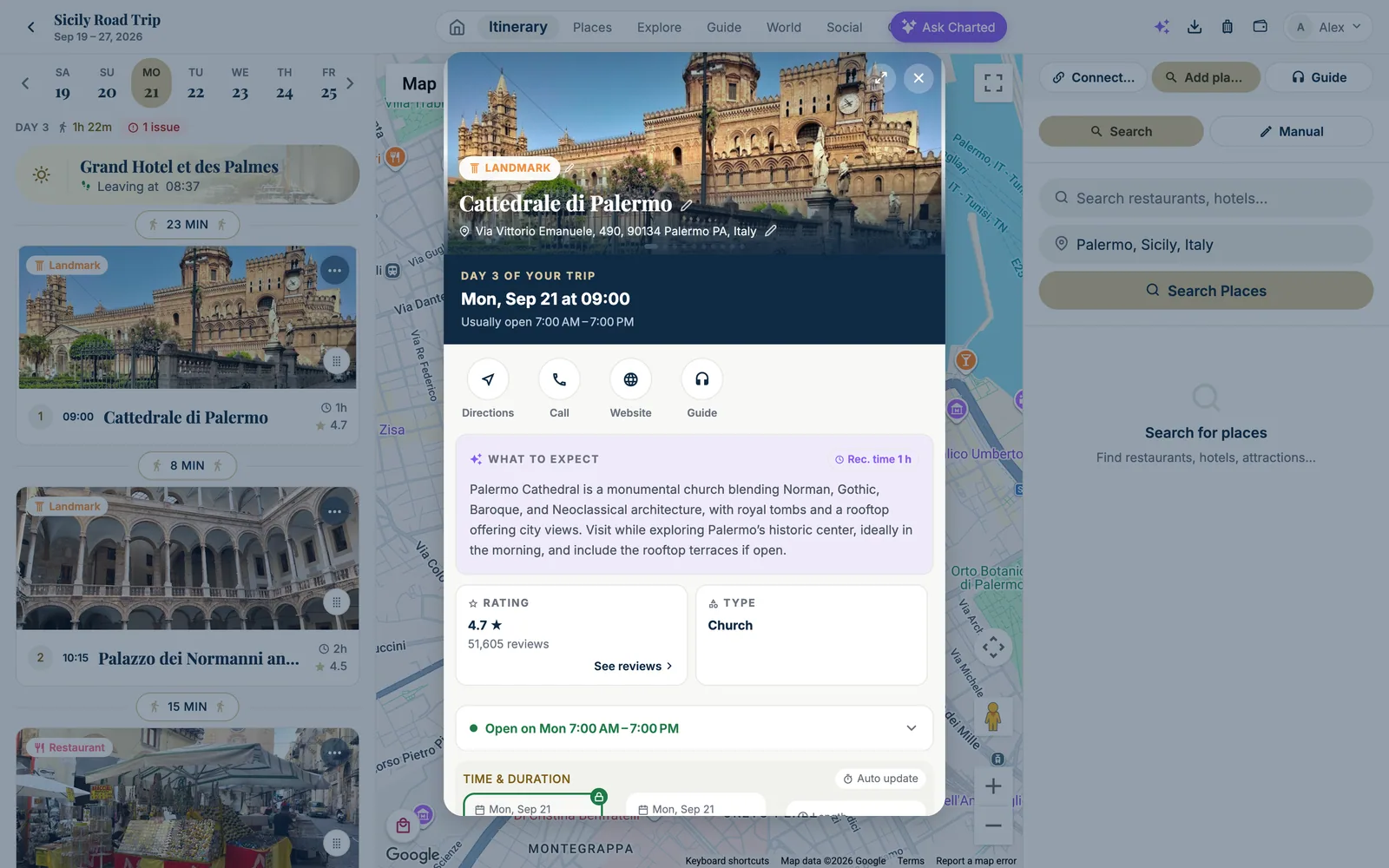
The same card everywhere — a search result, a saved place, a stop in your day. Google photos and reviews, live; an AI summary of what to expect; opening hours the day you go.

  • Day 3 of your trip — Mon, Sep 21 at 09:00 — the moment line is alive on the day itself.
  • What to expect with a recommended time, used by the planner to size the visit.
  • Rating and 51,605 reviews, type, hours, time & duration, reservation, documents, notes — and a headphone button to hear the guide's narration.
The place card opened as a pop-up over the planner: a photo of Cattedrale di Palermo with the orange LANDMARK chip, the address Via Vittorio Emanuele 490, 90134 Palermo; a navy band reading 'DAY 3 OF YOUR TRIP — Mon, Sep 21 at 09:00 — Usually open 7:00 AM–7:00 PM'; round buttons Directions, Call, Website, Guide; a purple 'WHAT TO EXPECT' AI summary with a 'Rec. time 1 h' badge describing the cathedral's Norman, Gothic, Baroque and Neoclassical architecture and its rooftop views; a RATING tile (4.7 stars, 51,605 reviews, See reviews), a TYPE tile (Church), a green 'Open on Mon 7:00 AM–7:00 PM' row and the Time & duration block with Auto update.
The card of a stop, over the planner. On the phone it's the same card, full screen.
Ask Charted

A copilot that knows the screen — and acts

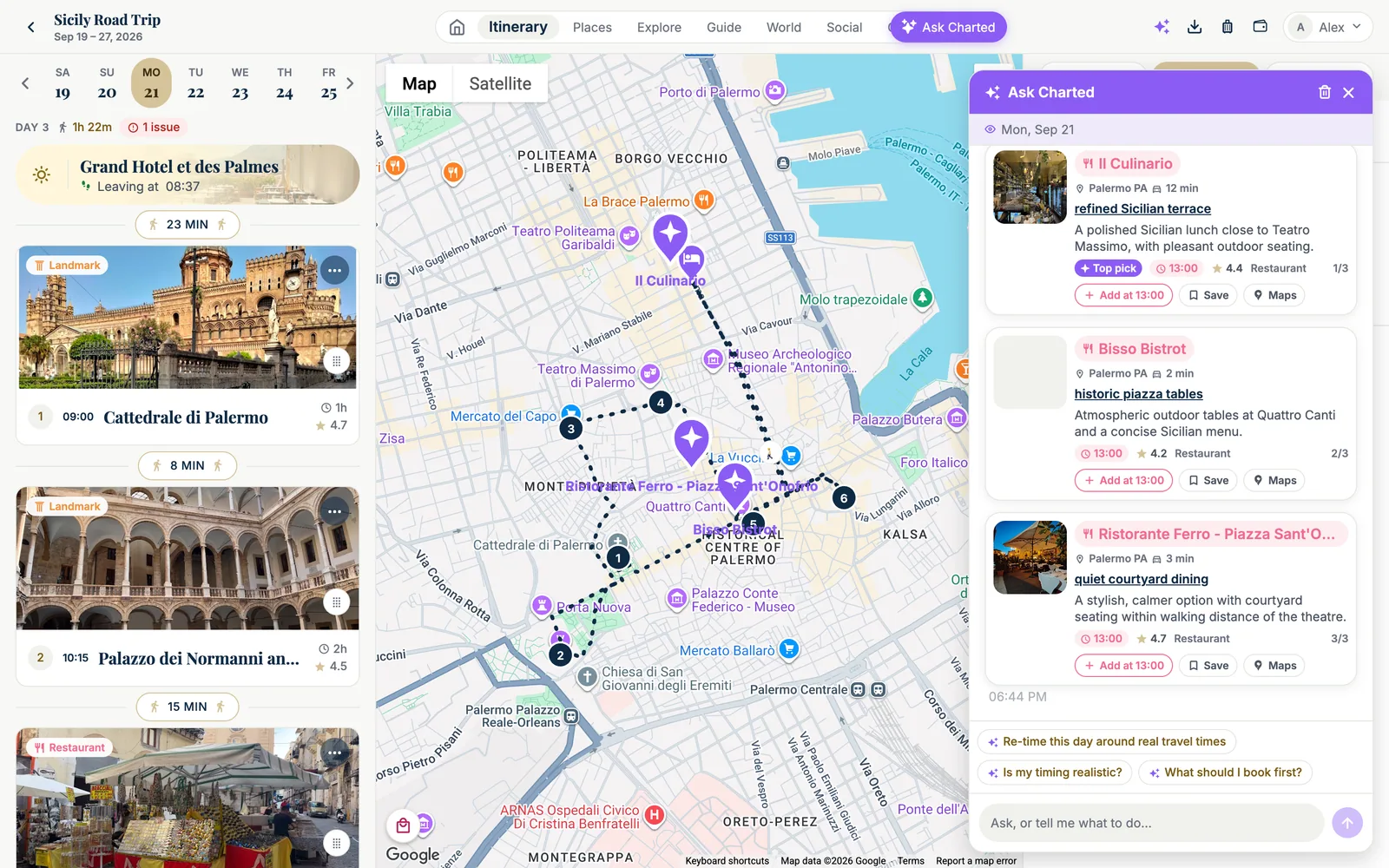
It reads the day you're looking at, the places listed on the right, your habits from past trips. Ask for lunch spots and you get cards, not paragraphs. Say "place these five over two days" and it does — with real travel times.

The Ask Charted bubble opened over the planner, purple header 'Ask Charted' and the context line 'Mon, Sep 21'. The traveler asked for three lunch spots with a terrace near Teatro Massimo; the answer is three cards: 'Il Culinario' (Palermo, 12 min, 'refined Sicilian terrace', Top pick, 13:00, 4.4 stars, Restaurant, 1/3), 'Bisso Bistrot' (2 min, 'historic piazza tables', 13:00, 4.2 stars, 2/3) and 'Ristorante Ferro – Piazza Sant'Onofrio' (3 min, 'quiet courtyard dining', 13:00, 4.7 stars, 3/3), each with a photo and the buttons 'Add at 13:00', 'Save' and 'Maps'. The same three restaurants appear on the Google map as large purple pins with their names, next to the day's numbered stops. Under the cards, ready-made commands: 'Re-time this day around real travel times', 'Is my timing realistic?', 'What should I book first?', and the field 'Ask, or tell me what to do…'.
Three lunch spots near Teatro Massimo, in seconds: cards you can add at 13:00, save to a board or open in Maps — and purple pins on the map.
Add

Five ways in. Pick the one that fits the moment.

A trip or a place can enter Charted by hand, from a video you just watched, from the AI you already plan with, from your inbox — or by asking Charted itself. Whatever the door, it ends up as the same cards, on the same map, with real photos, hours and travel times.

From a video to a trip, in one minute

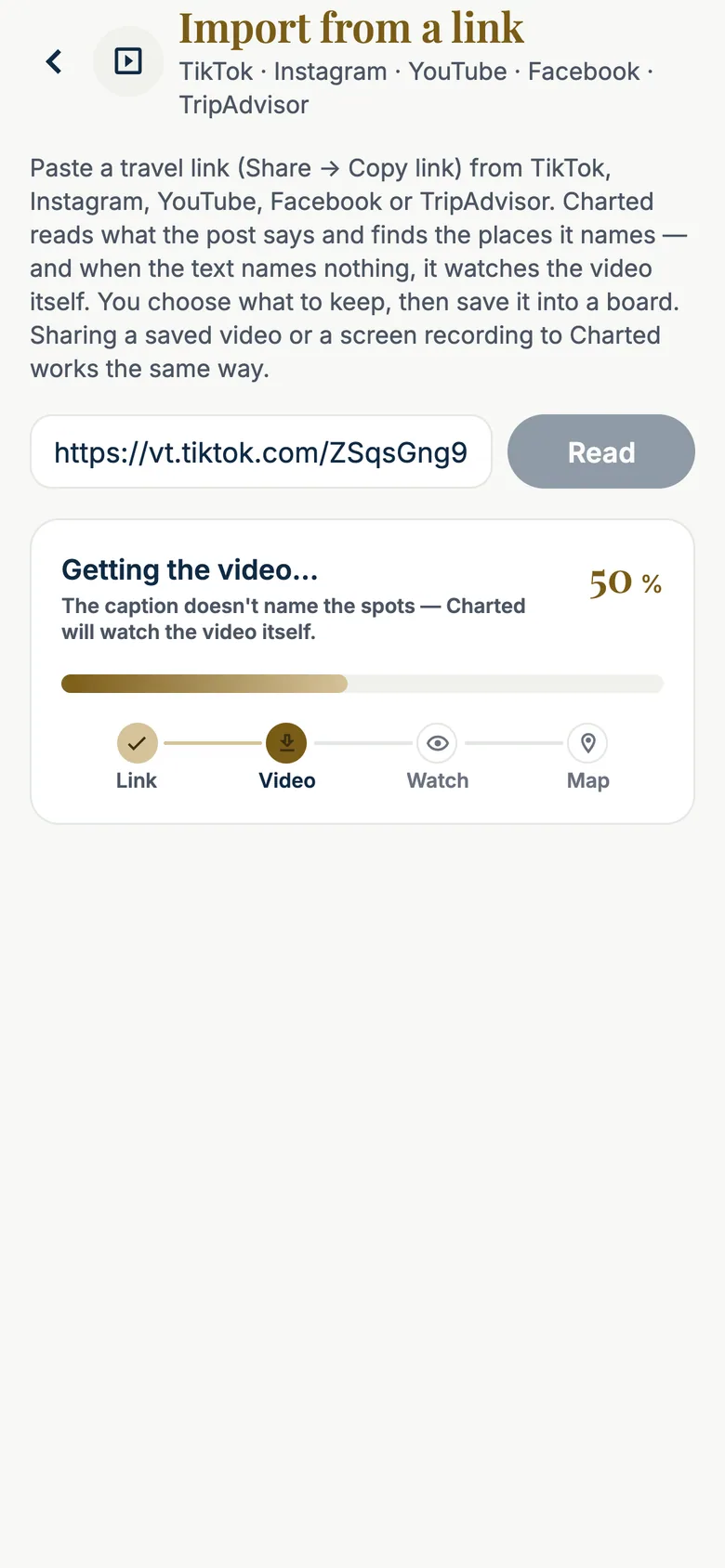
Share a TikTok to Charted (or paste the link). It reads what the post says, watches the video when the text names nothing, places every spot on Google — and shows you the list before saving. Flip one switch and the board becomes a trip without dates, stops already in walking order.

iPhone screen 'Import from a link — TikTok · Instagram · YouTube · Facebook · TripAdvisor'. The intro says: paste a travel link, Charted reads what the post says and finds the places it names — and when the text names nothing, it watches the video itself. The field holds a TikTok link (vt.tiktok.com/ZSqsGng9…) next to a Read button, and the progress card reads 'Getting the video… 50 % — The caption doesn't name the spots — Charted will watch the video itself', with the four steps Link (done), Video (in progress), Watch and Map.
Link · Video · Watch · Map — the real steps, as they happen. No caption? It watches.
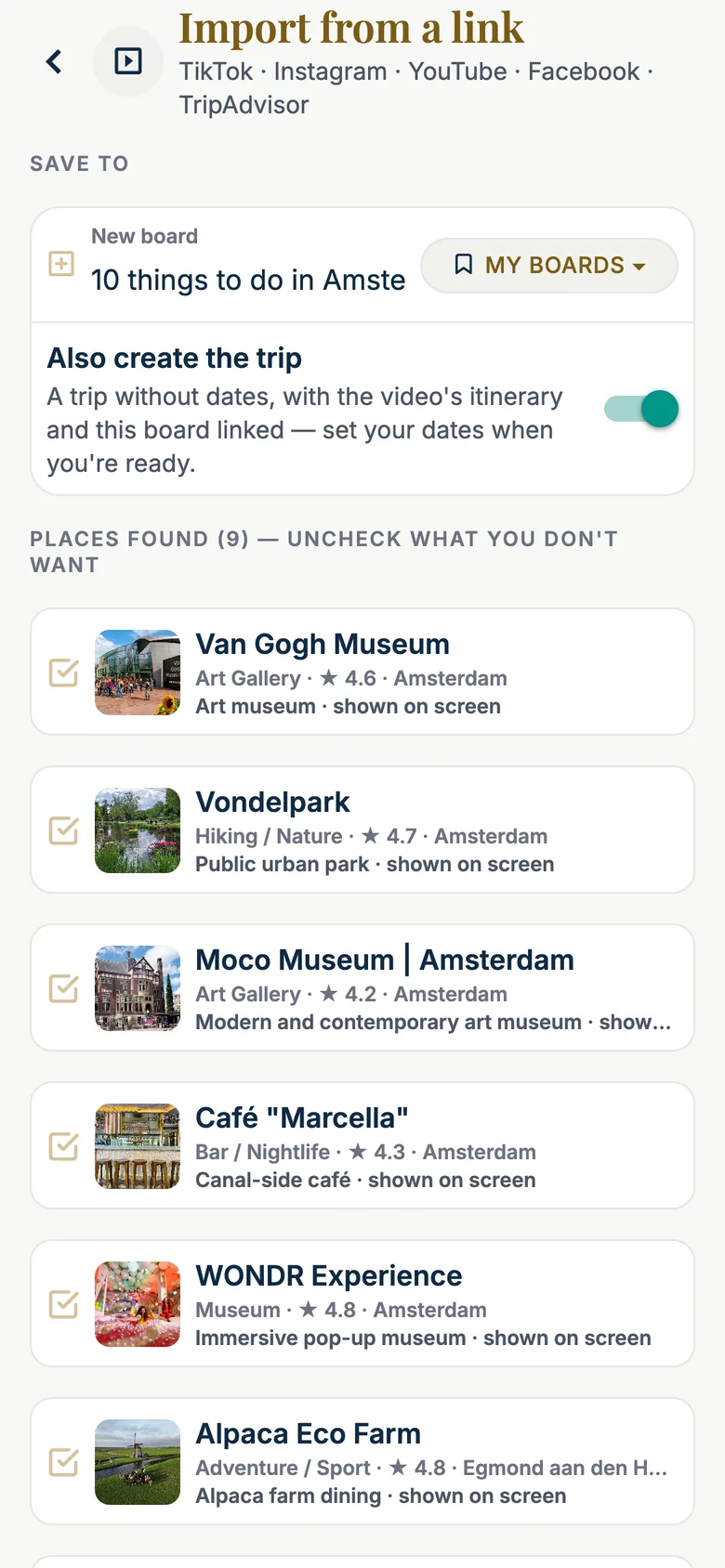
The same screen once the video has been watched. 'SAVE TO': a new board named '10 things to do in Amsterdam' with a 'MY BOARDS' picker, and the switch 'Also create the trip — a trip without dates, with the video's itinerary and this board linked' turned on. 'PLACES FOUND (9) — UNCHECK WHAT YOU DON'T WANT': Van Gogh Museum (Art Gallery, 4.6, Amsterdam, 'Art museum · shown on screen'), Vondelpark (Hiking / Nature, 4.7, 'Public urban park · shown on screen'), Moco Museum (Art Gallery, 4.2), Café Marcella (Bar / Nightlife, 4.3, 'Canal-side café'), WONDR Experience (Museum, 4.8, 'Immersive pop-up museum'), Alpaca Eco Farm (Adventure / Sport, 4.8, Egmond aan den Hoef), each with a Google photo and a checked box.
Every place it found, with the proof. Uncheck what you don't want — and “Also create the trip”.
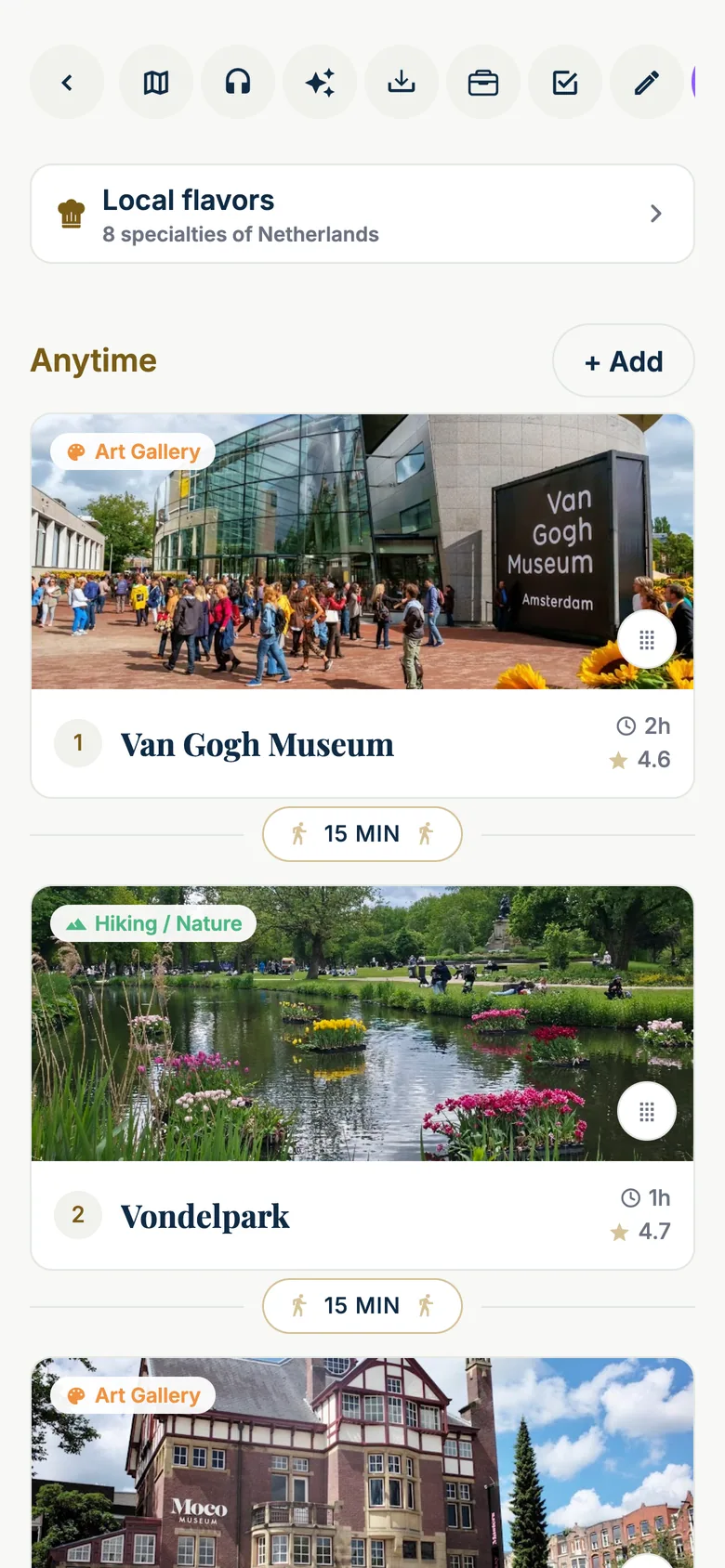
The trip Charted created from the video, on the iPhone: the trip's row of round actions (back, day map, voice guide, Ask Charted, import, wallet, packing, edit), a 'Local flavors — 8 specialties of Netherlands' card, then the 'Anytime' list with an '+ Add' button: stop 1 Van Gogh Museum (Art Gallery, 2 h, 4.6) with its photo, a '15 MIN' walking pill, stop 2 Vondelpark (Hiking / Nature, 1 h, 4.7), another '15 MIN' pill, then the Moco Museum card.
The trip it made: the video's stops, photos, and the walk between them.
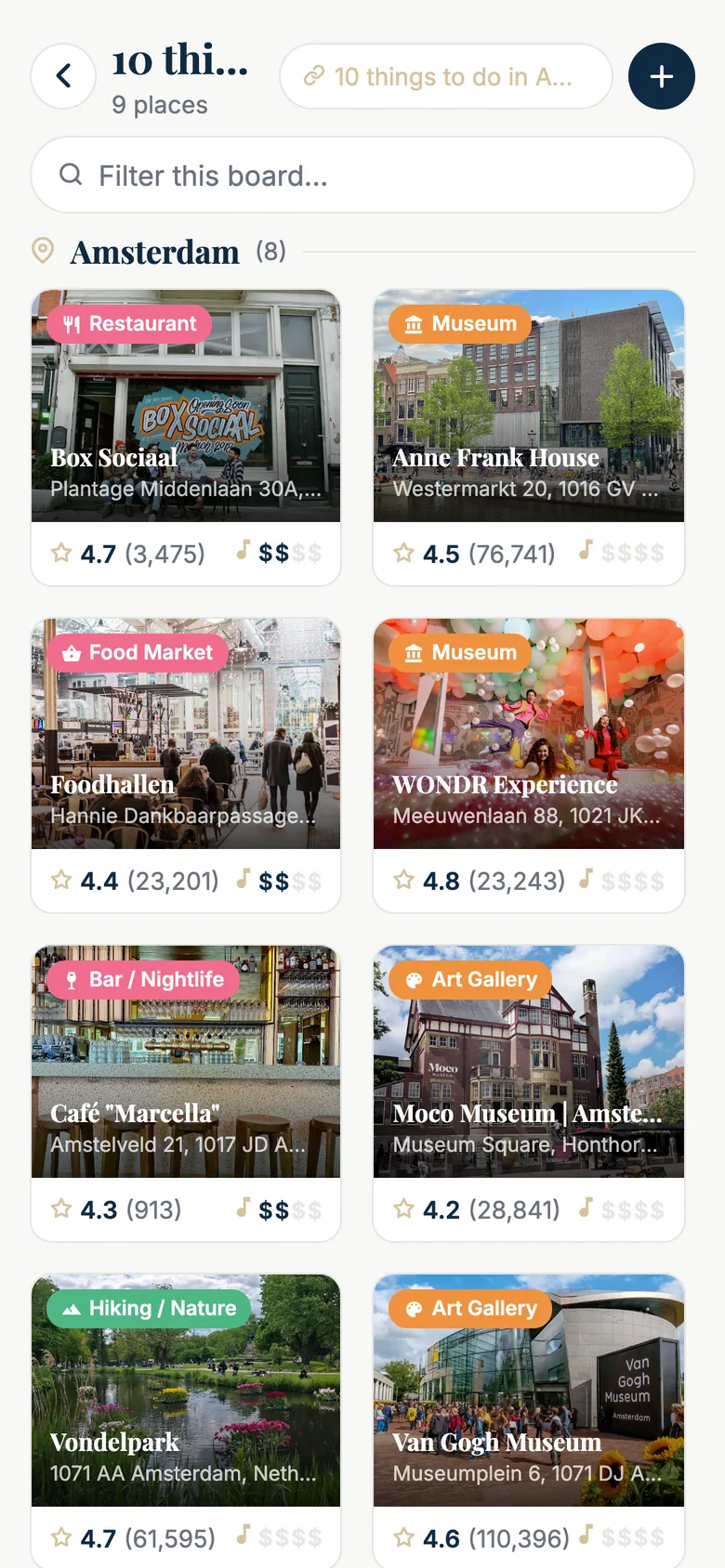
The board created from the video — '10 things to do in Amsterdam', 9 places, linked to the trip of the same name, a 'Filter this board…' field — grouped under 'Amsterdam (8)': a grid of photo cards with a category chip, the name, the address, the rating with its number of reviews and the price level: Box Sociaal (Restaurant, 4.7, 3,475), Anne Frank House (Museum, 4.5, 76,741), Foodhallen (Food Market, 4.4, 23,201), WONDR Experience (Museum, 4.8, 23,243), Café Marcella (Bar / Nightlife, 4.3, 913), Moco Museum (Art Gallery, 4.2, 28,841), Vondelpark (Hiking / Nature, 4.7, 61,595), Van Gogh Museum (Art Gallery, 4.6, 110,396).
And the board, grouped by city — linked to the trip.

Tell Charted what you want; it writes the day

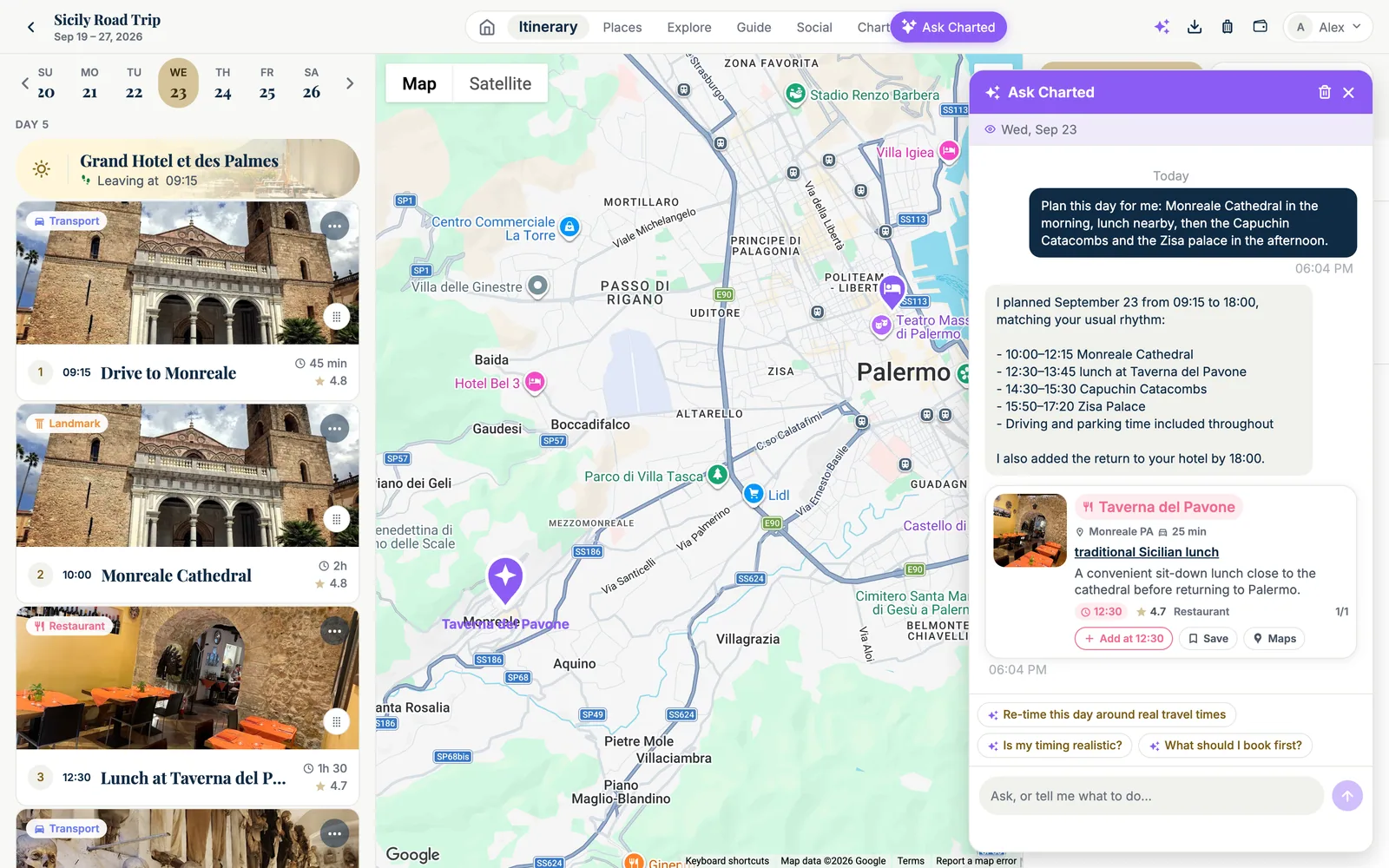
“Plan this day for me: Monreale Cathedral in the morning, lunch nearby, then the Capuchin Catacombs and the Zisa palace in the afternoon.” The copilot creates the stops with real driving and walking times, picks a lunch spot it can vouch for, and tells you exactly what it scheduled.

  • It knows your rhythm — when your days start, when you eat — from your past trips.
  • Every suggested place is verified on Google and within reach of your route.
  • Change your mind: drag a stop, and the schedule engine re-times the rest.
The planner for Wednesday, Sep 23 (day 5 of the Sicily Road Trip) right after one request to Ask Charted. In the purple bubble the traveler wrote 'Plan this day for me: Monreale Cathedral in the morning, lunch nearby, then the Capuchin Catacombs and the Zisa palace in the afternoon.' Charted answered: 'I planned September 23 from 09:15 to 18:00, matching your usual rhythm: 10:00–12:15 Monreale Cathedral, 12:30–13:45 lunch at Taverna del Pavone, 14:00–15:30 Capuchin Catacombs, 15:50–17:20 Zisa Palace, driving and parking time included throughout. I also added the return to your hotel by 18:00', with a card for Taverna del Pavone (Monreale PA, 25 min, 'traditional Sicilian lunch', 4.7 stars, Restaurant, buttons Add at 12:30, Save, Maps). On the left the day is now filled: the ghost hotel 'Grand Hotel et des Palmes — Leaving at 09:15', stop 1 'Drive to Monreale' at 09:15 (45 min, 4.8), stop 2 'Monreale Cathedral' at 10:00 (2 h, 4.8), stop 3 'Lunch at Taverna del Pavone' at 12:30 (1 h 30, 4.7), each with a photo. In the middle, a Google map of Palermo and Monreale with a purple pin on Taverna del Pavone.
One sentence in, a planned day out — 09:15 to 18:00, driving and parking included.

Already planning with Claude or ChatGPT? Connect them.

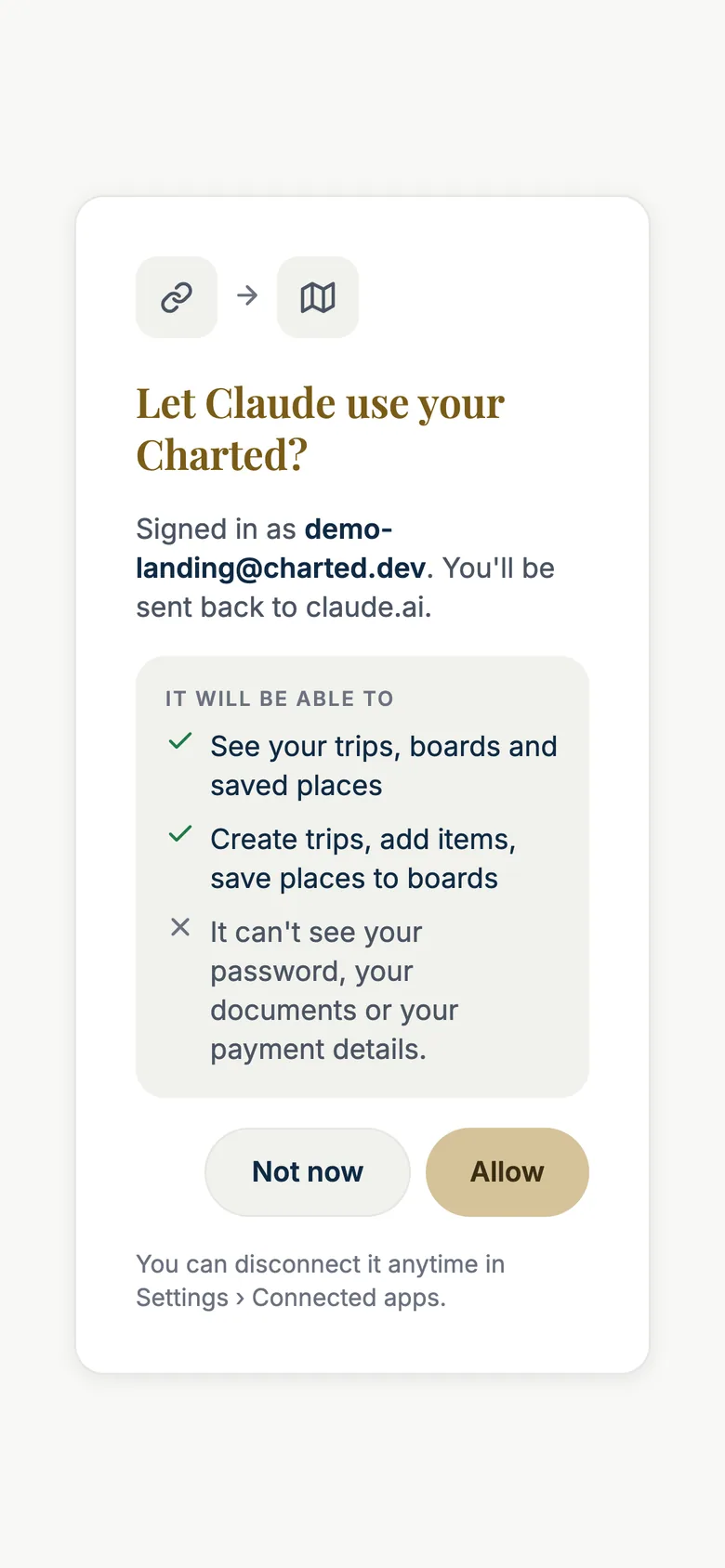
Charted is a connector: add api.charted.travel/mcp in Claude or ChatGPT, sign in once, and your assistant can list your trips, create one from the plan you just made together, add stops, or save the places it finds into a board. It never guesses the target: without a date it asks whether you mean a trip or a board, and it always offers “a new one”.

  • What it can do is shown in plain words before you allow it — and you can disconnect it anytime.
  • It can't see your password, your documents or your payment details.
  • Nothing to install: Settings › Connected apps has the address and the three steps.
The consent page Charted shows when Claude connects, on an iPhone-sized screen: a link icon pointing to a map icon, the title 'Let Claude use your Charted?', the line 'Signed in as demo-landing@charted.dev. You'll be sent back to claude.ai.', a box 'IT WILL BE ABLE TO' with two green check marks — 'See your trips, boards and saved places' and 'Create trips, add items, save places to boards' — and a cross: 'It can't see your password, your documents or your payment details.' Two buttons, 'Not now' and 'Allow', and the note 'You can disconnect it anytime in Settings › Connected apps.'
What Claude sees when it connects — and what it will never see.

Or simply by hand

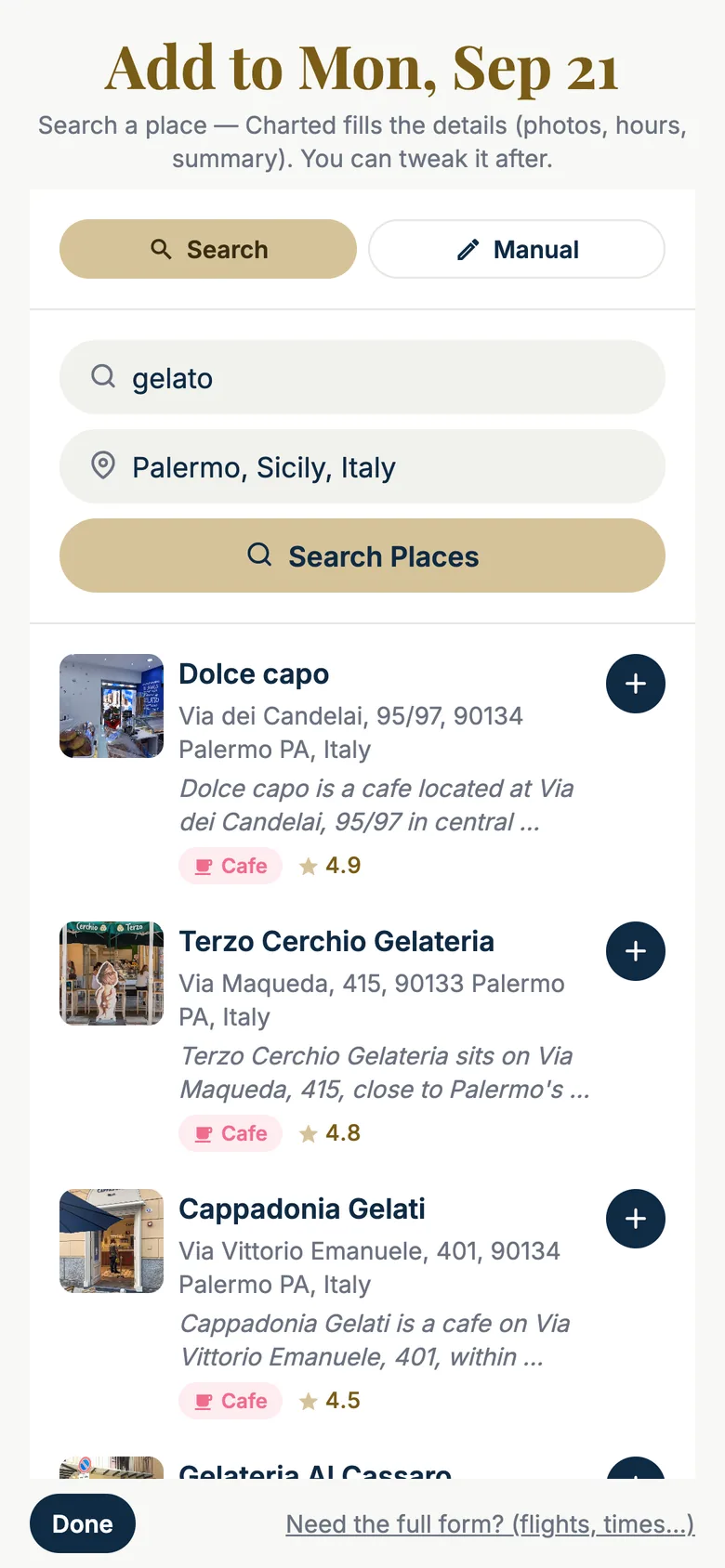
Type a few letters, pick the place, tap +. Charted fills the card from Google — photos, address, rating, opening hours — and writes a one-line description so you remember why it caught your eye. A manual entry for anything Google doesn't know is one tap away.

  • The search is scoped to the city of your day, so “gelato” means gelato in Palermo.
  • Saved places from your boards can be dropped into a day from the planner, with the right travel time.
  • Flights, hotels and rentals have their own form: numbers, dates, check-in and check-out.
iPhone screen 'Add to Mon, Sep 21 — Search a place, Charted fills the details (photos, hours, summary). You can tweak it after.' A Search / Manual toggle, the search field reading 'gelato', the location field 'Palermo, Sicily, Italy' and a gold 'Search Places' button. Results, each with a photo, the address, a one-line description, a pink Cafe chip, the rating and a round + button: Dolce capo (Via dei Candelai 95/97, 4.9), Terzo Cerchio Gelateria (Via Maqueda 415, 4.8), Cappadonia Gelati (Via Vittorio Emanuele 401, 4.5), Gelateria Al Cassaro. At the bottom, 'Done' and 'Need the full form? (flights, times…)'.
Search, then +. The rest is filled in.
Book

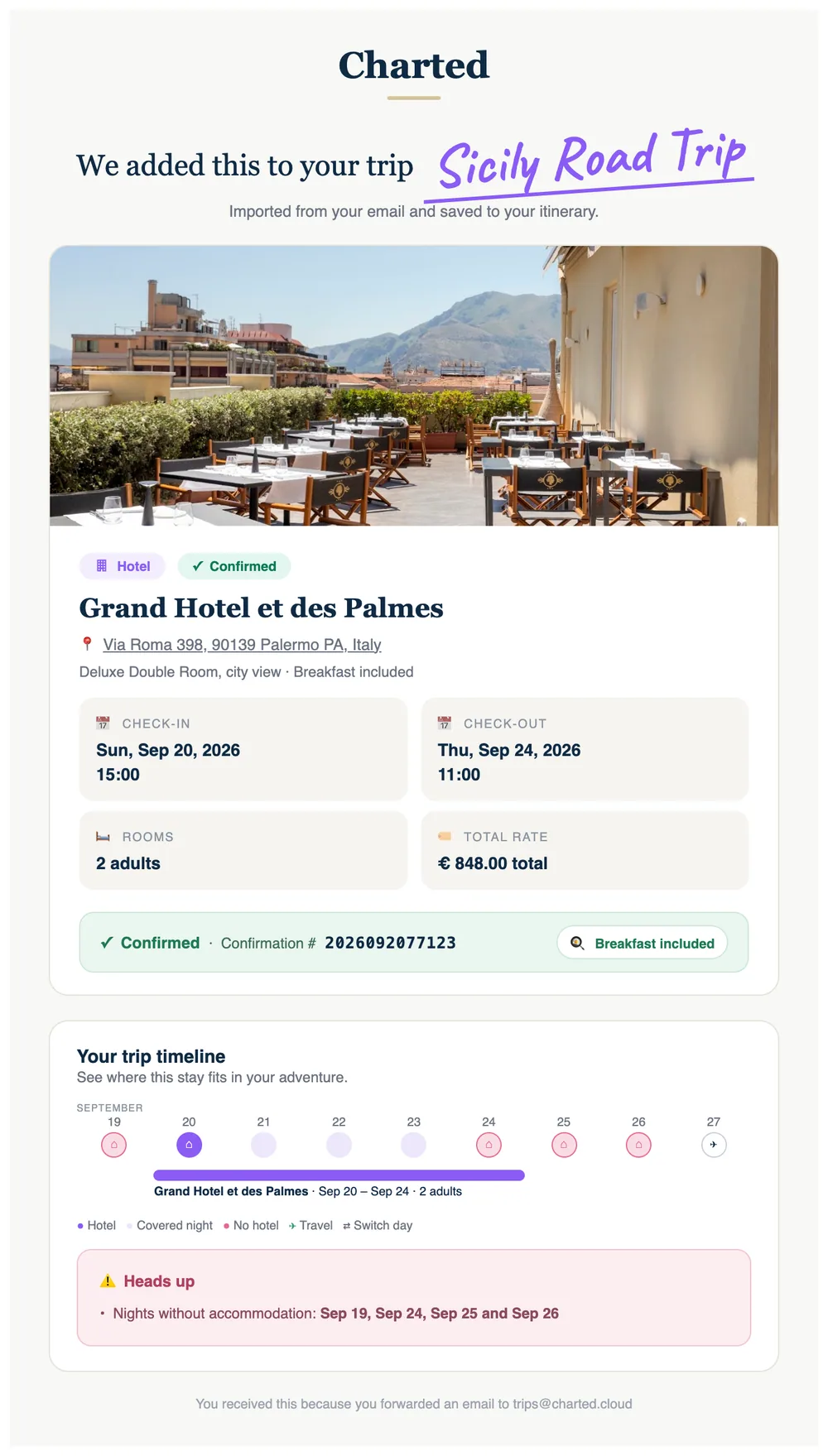
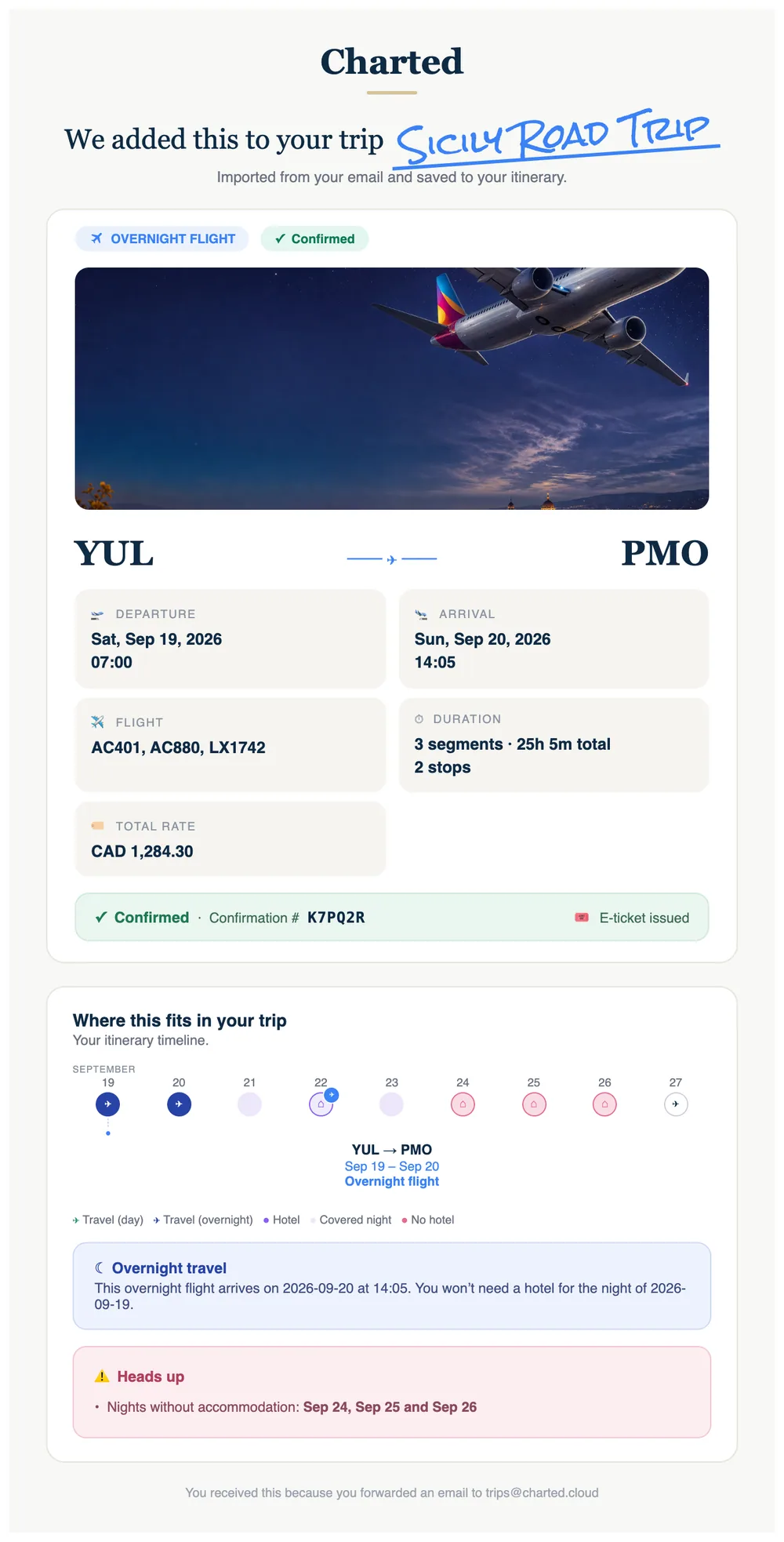
Forward any booking. It lands in the right trip — and this comes back.

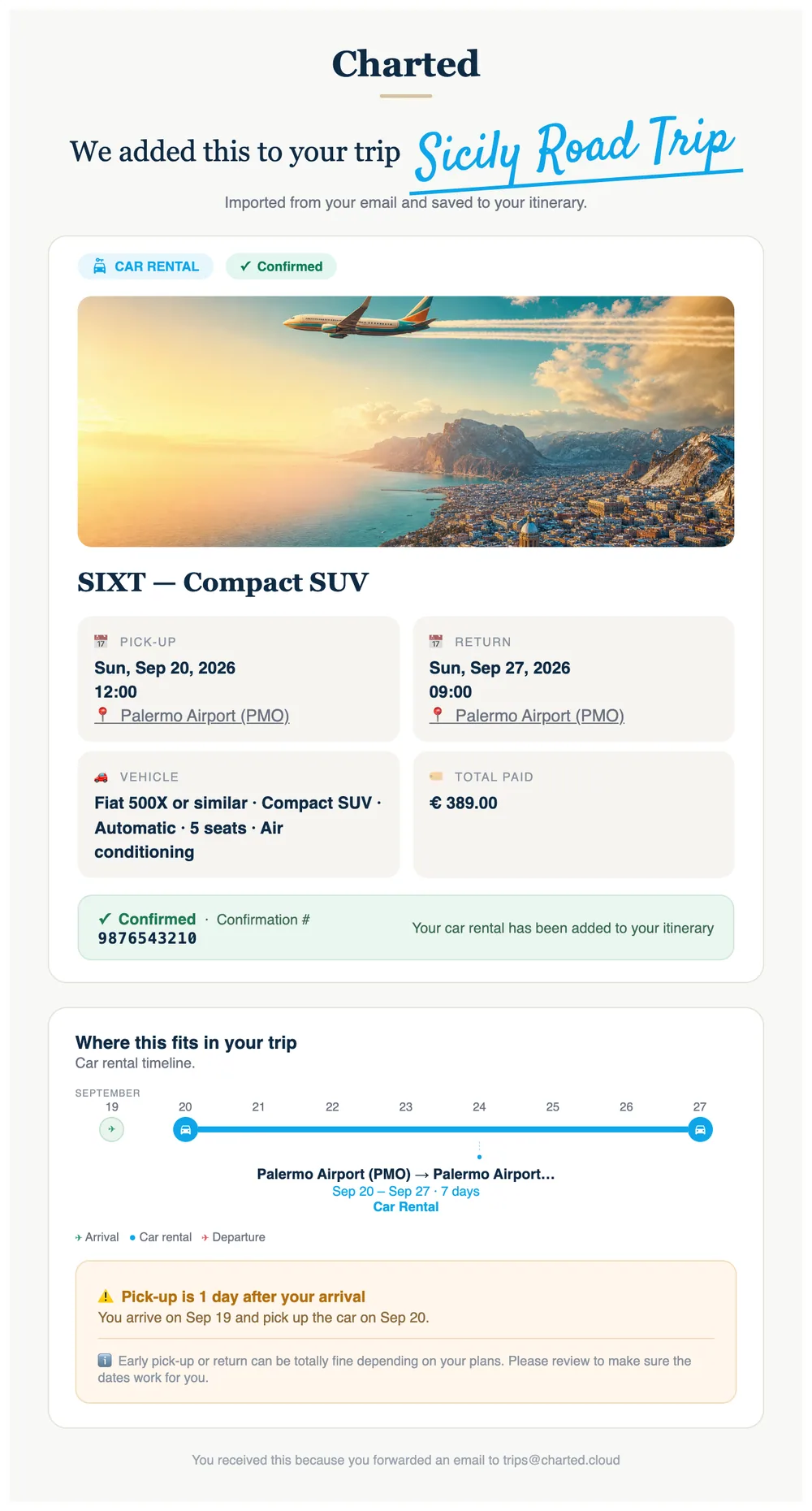
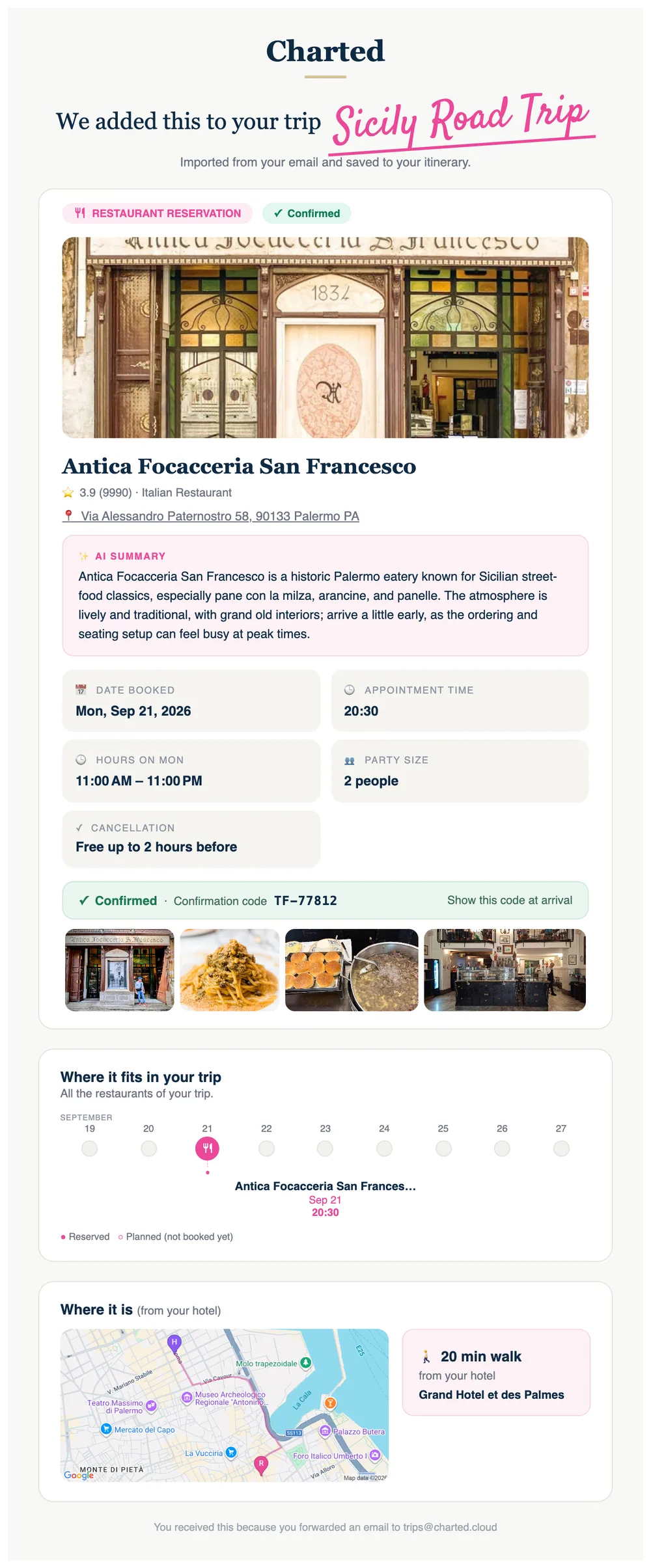
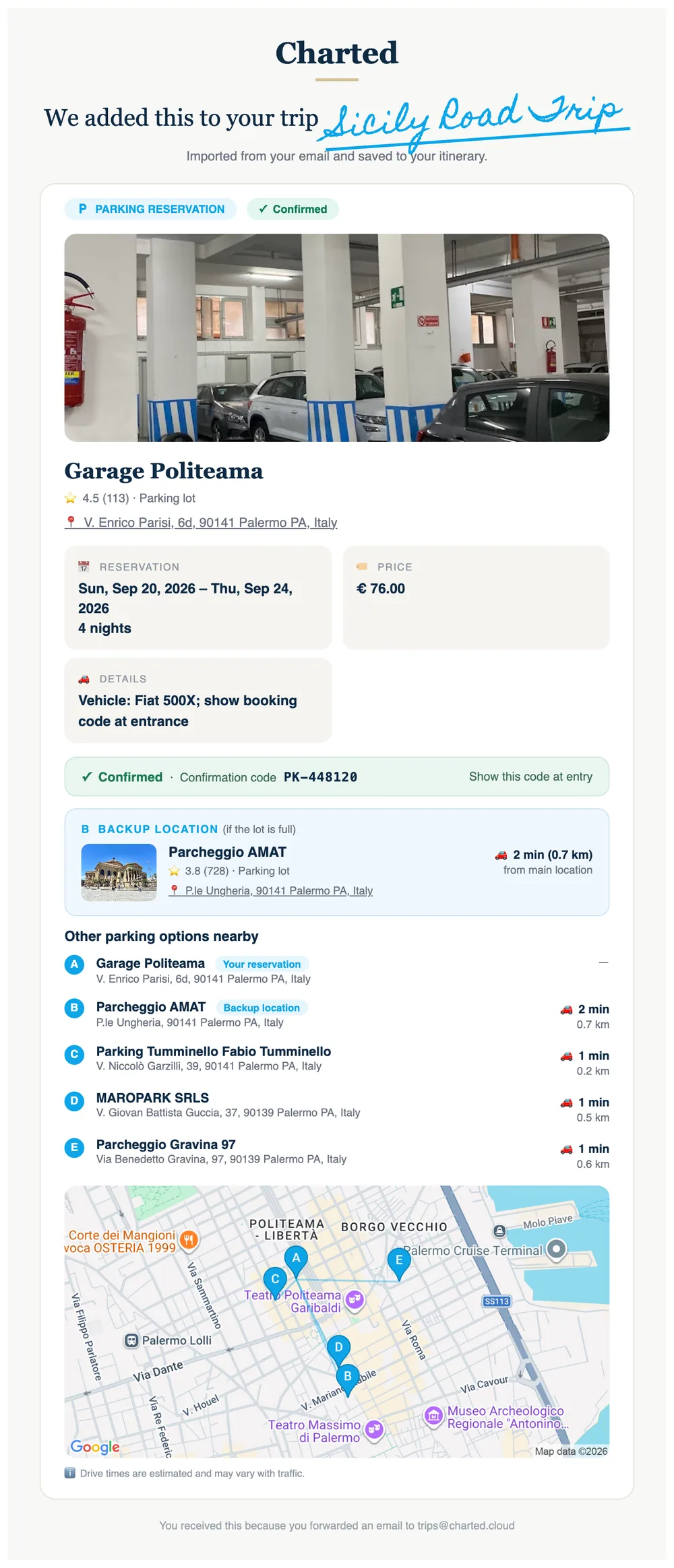
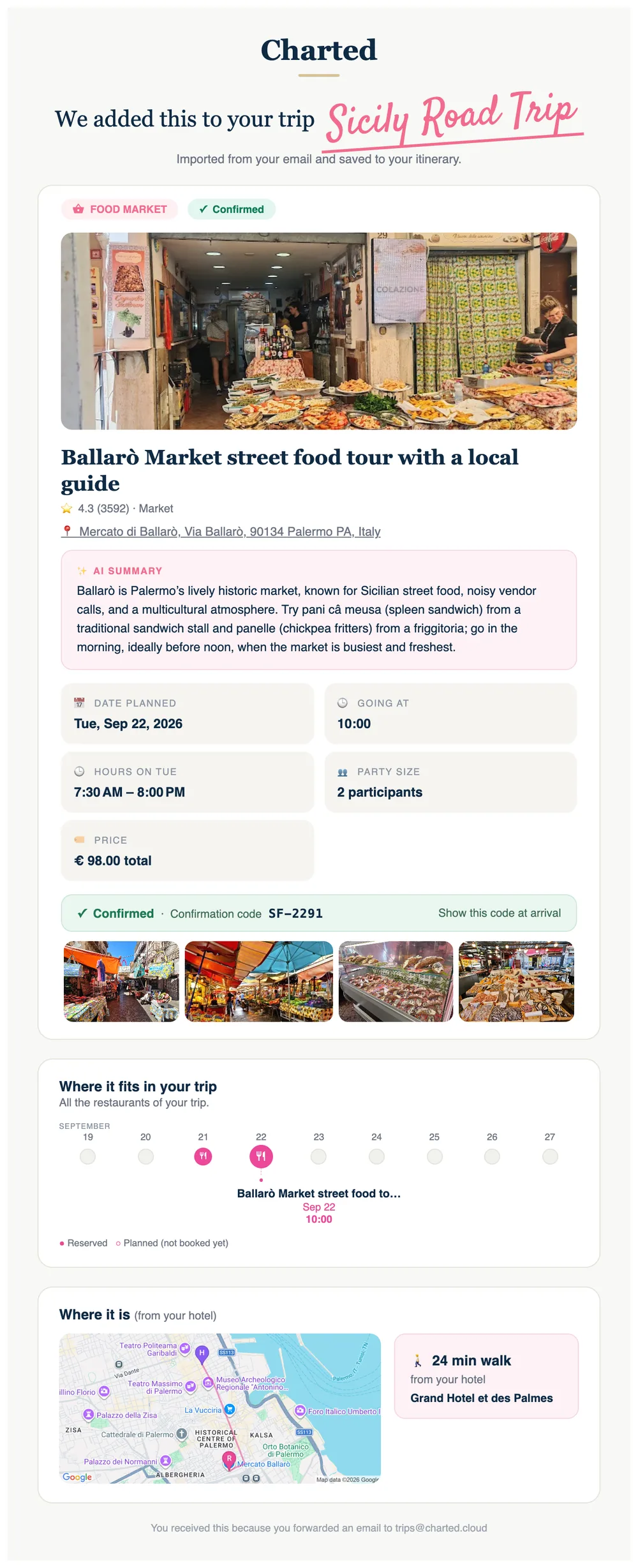
Send the confirmation email to Charted, paste it, or photograph it. The hotel, flight, car, parking, table or tour is created in the trip whose dates match, confirmed by its number, illustrated with a real photo, timed. Then Charted writes you back.

Six real emails, one per kind of booking. Each one places the item on a timeline of your whole trip — and flags the nights without a hotel.

Or import a whole trip from anything

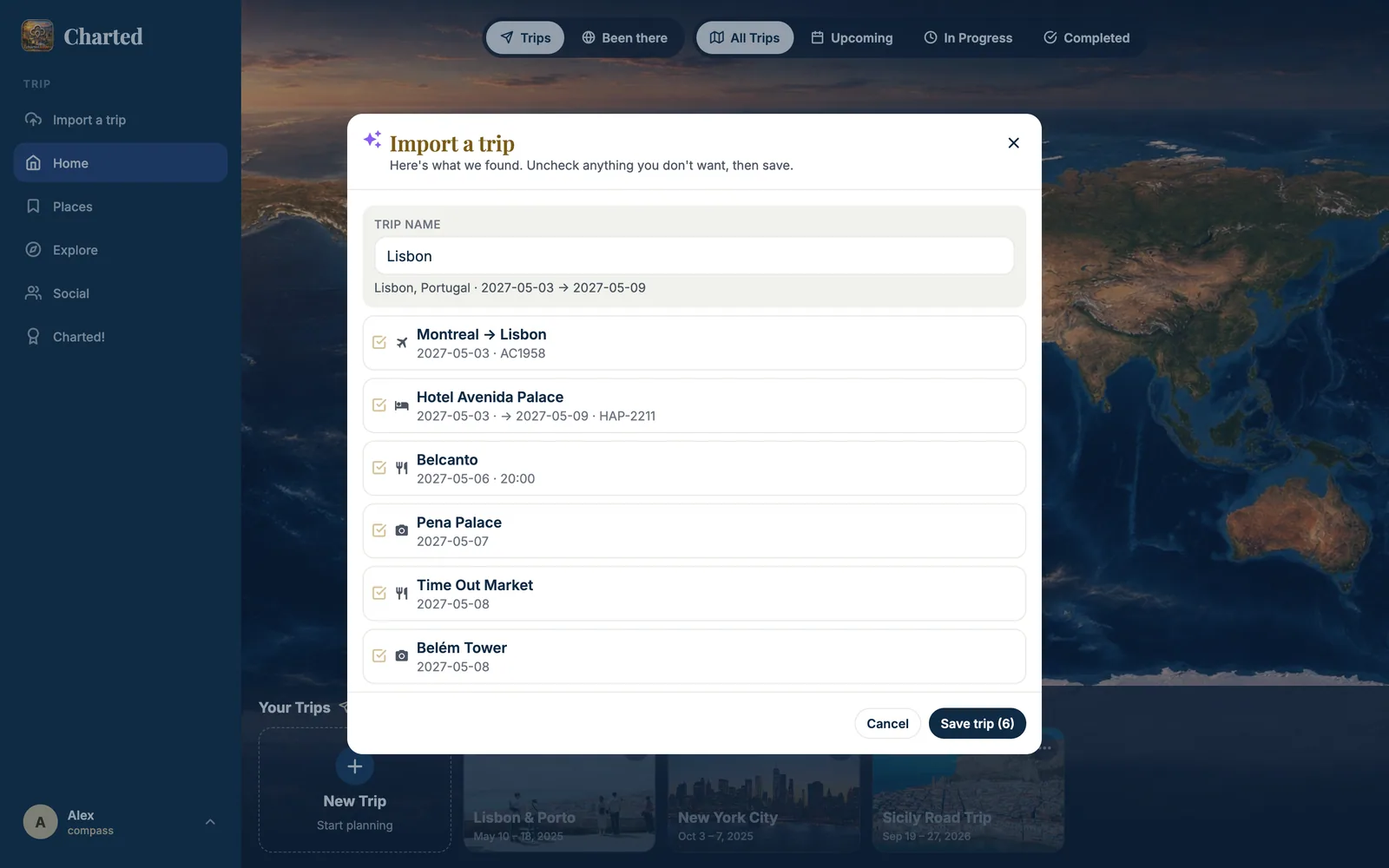
Text, a link, a PDF, a Word file, a screenshot — Charted reads everything, shows you the trip before saving, then resolves every place on Google: photo, address, coordinates.

  • Videos and links have their own door — see From a video to a trip above.
  • Bring your past trips in the same way — they count for your badges.
The 'Import a trip' window after Preview, over the world map: 'Here's what we found. Uncheck anything you don't want, then save.' TRIP NAME 'Lisbon' with 'Lisbon, Portugal · 2027-05-03 → 2027-05-09', then six checked items read from the pasted text: Montreal → Lisbon (2027-05-03 · AC1958), Hotel Avenida Palace (2027-05-03 → 2027-05-09 · HAP-2211), Belcanto (2027-05-06 · 20:00), Pena Palace (2027-05-07), Time Out Market (2027-05-08), Belém Tower (2027-05-08), and the buttons Cancel and 'Save trip (6)'.
Paste anything. Charted reads it, shows the trip — dated, numbered, with the confirmation codes — and you save.
Live it

On the ground, in your pocket

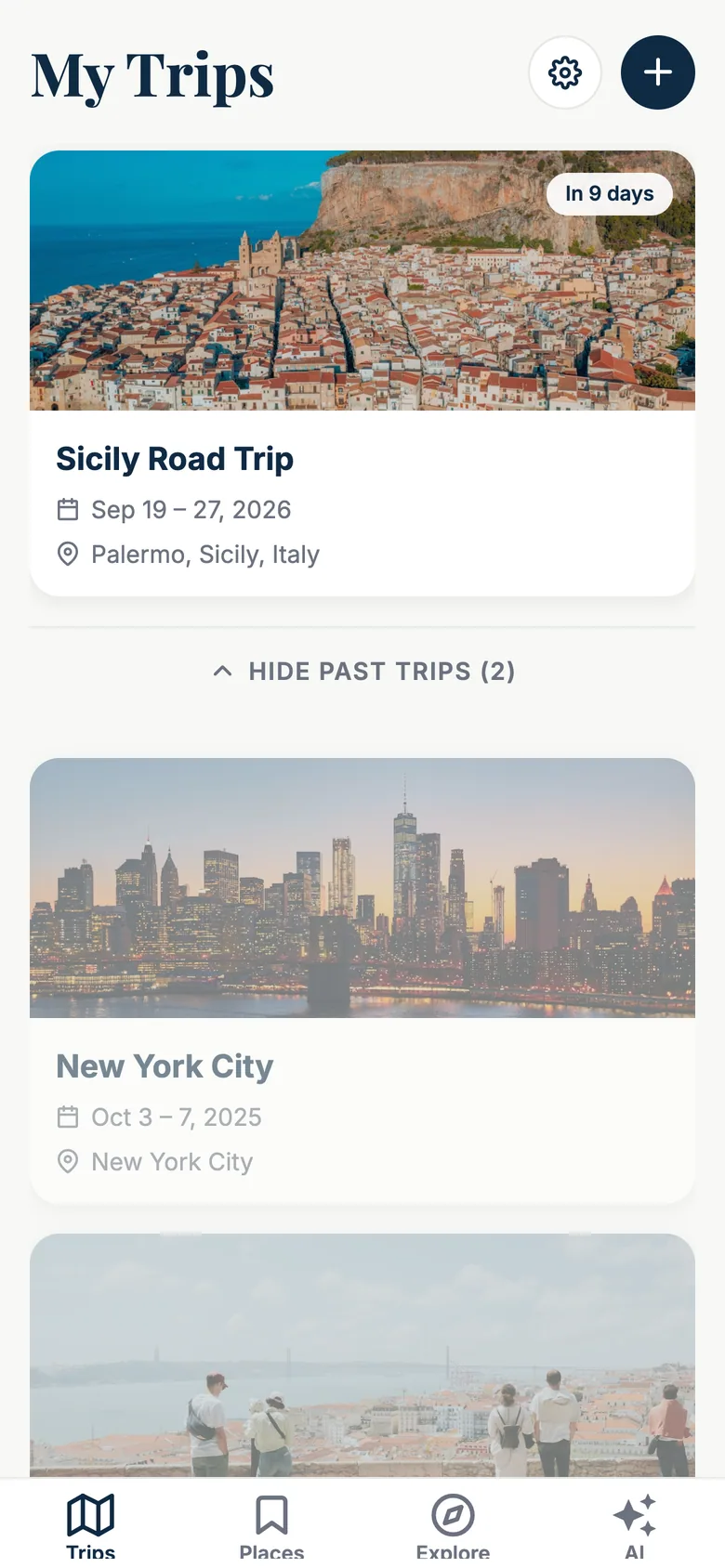
The iPhone app is the same app — same cards, same days, same map — with what a phone can do: GPS, camera, notifications, the lock screen.

iPhone screen 'My Trips': a large card with a photo of Cefalù for 'Sicily Road Trip', Sep 19–27, 2026, Palermo, Sicily, Italy, with an 'In 9 days' badge; below, the past trips Lisbon & Porto (May 10–18, 2025) and New York City (Oct 3–7, 2025) with their photos; at the bottom the tab bar Trips, Places, Explore, AI.
Your trips, with a countdown.
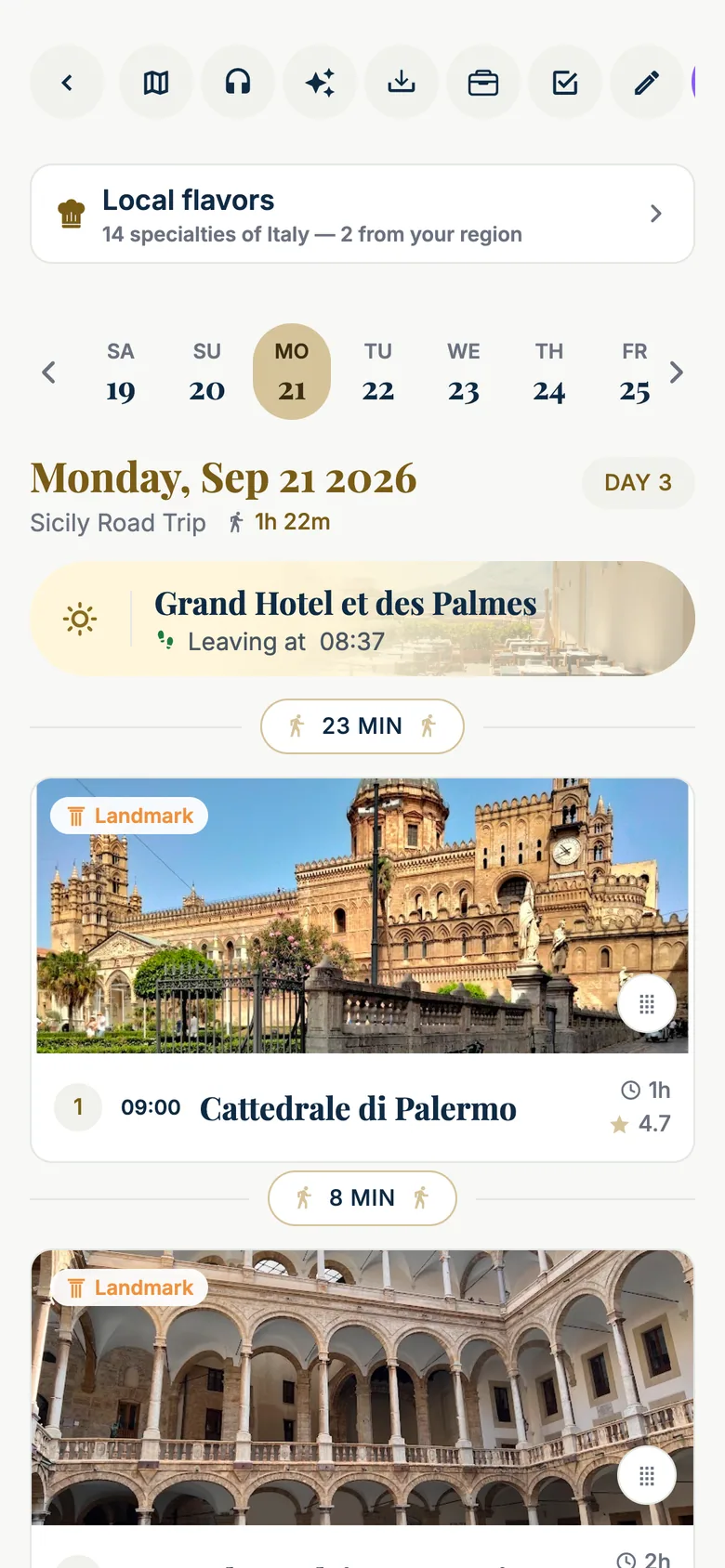
iPhone screen of Monday, Sep 21 2026, DAY 3 of the Sicily Road Trip with 1h 22m of walking: a row of round actions (back, day map, voice guide, AI, import, wallet, packing, edit), a 'Local flavors — 14 specialties of Italy' card, the day strip, the ghost hotel 'Grand Hotel et des Palmes — Leaving at 08:37', a '23 MIN' walking pill, stop 1 Cattedrale di Palermo at 09:00 with its photo (1 h, 4.7 stars), an '8 MIN' pill and Palazzo dei Normanni.
The day, with the walk between stops.
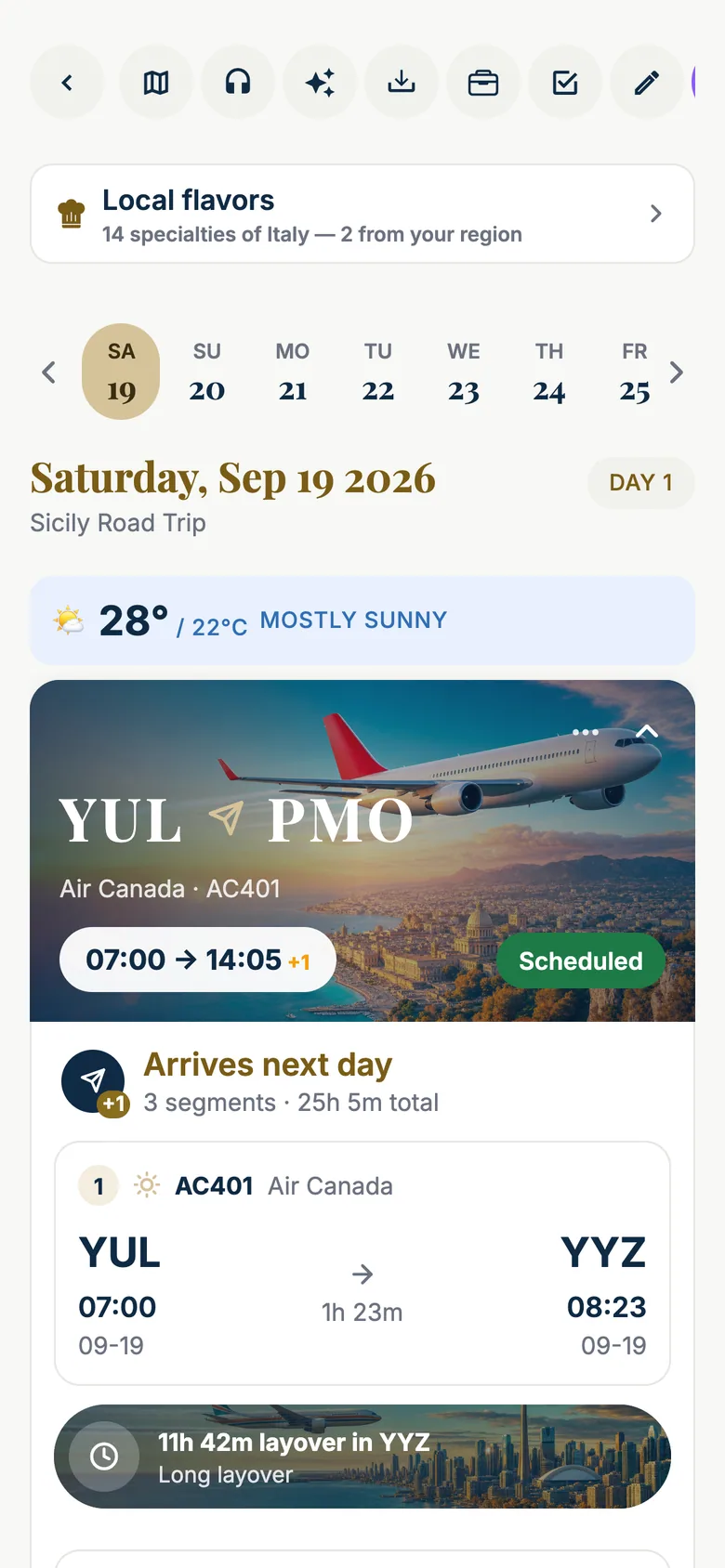
iPhone screen of Saturday, Sep 19 2026, day 1 of the Sicily Road Trip, weather 28°/22°C mostly sunny, with the flight card expanded: a hero image of an airliner over Palermo with 'YUL ✈ PMO', 'Air Canada · AC401', a pill '07:00 → 14:05 +1' and a green 'Scheduled' badge; then 'Arrives next day · 3 segments · 25h 5m total', segment 1 'AC401 Air Canada — YUL 07:00 → YYZ 08:23, 1h 23m' and a banner '11h 42m layover in YYZ — Long layover' over a photo of the Toronto skyline, with the next segments below.
Three legs, an 11-hour layover in Toronto, live gates when they're published.

Live flights, where you look

Gates, terminals, delays and baggage belts refresh on their own before and during the flight. A Flight tab appears 24 hours before departure. On iPhone, from two hours before departure to an hour after landing, the flight lives on the lock screen and in the Dynamic Island — gate in a yellow badge, countdown to gate departure, the plane advancing over the sea.

  • Local alerts: the day before, check-in time, when to leave for the airport.
  • A change of gate is a banner — even with the app closed.
  • Flights without a number are still understood: airports deduced from the cities, so the route to the hotel is computed.

Works offline

Trips, cards, photos and the documents you pin — passport, tickets — are kept on the phone. Airplane mode is not a problem; a translucent "Offline" pill tells you so and disappears by itself.

  • Packing lists per trip, with reusable master lists.
  • A trip wallet for documents and contacts, viewable on the plane.
  • Notifications for the sommelier's follow-up and for the trips of people you follow.
Voice guide

A guide in your ears — prepared on the web, told on the road

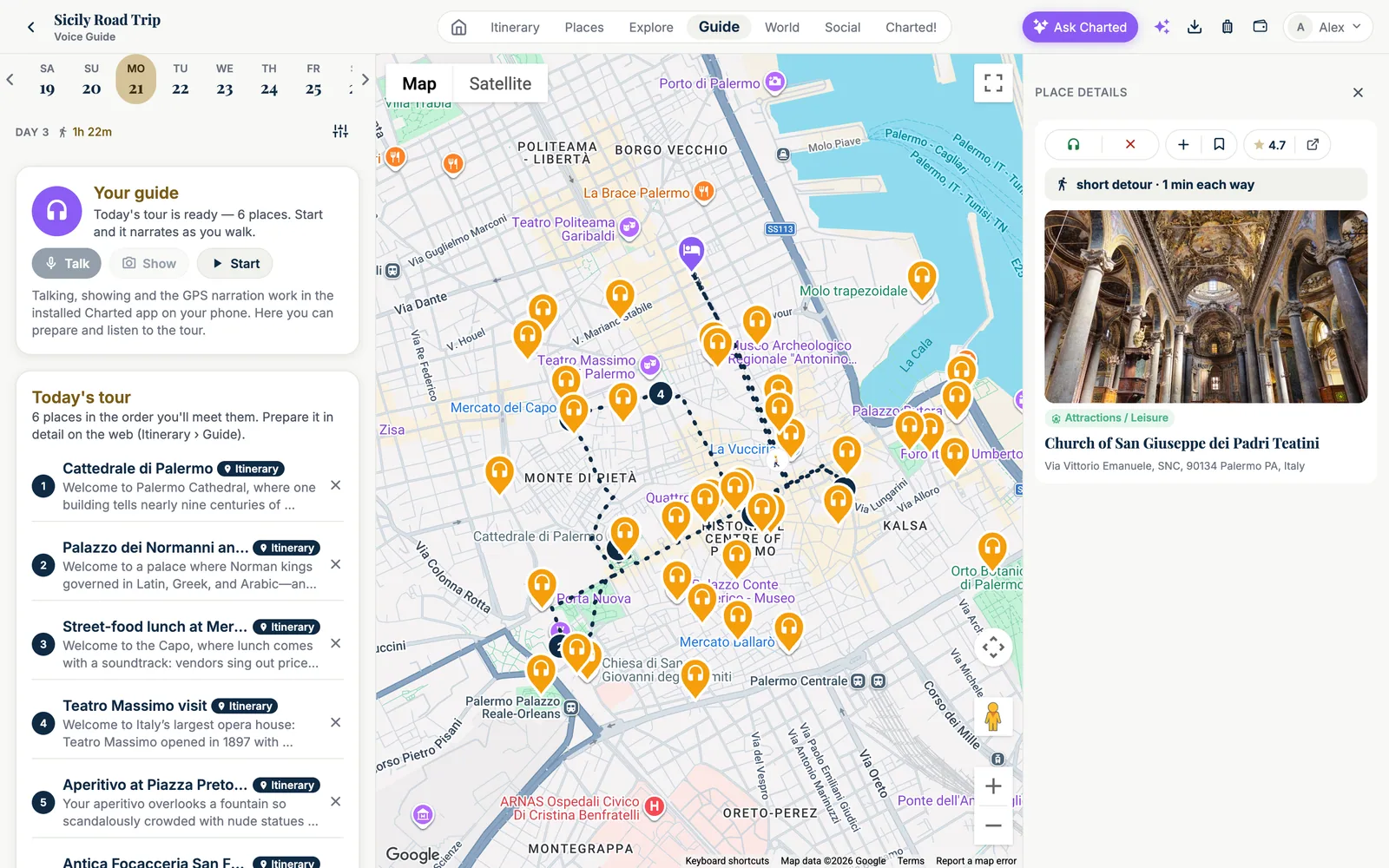
Before the day, Charted reads your stops and the route between them, finds what's worth telling along the way and writes the narration. On the road, it speaks when you pass each point, answers out loud, and looks at what you photograph.

The Voice Guide screen on the web for Monday, Sep 21 of the Sicily Road Trip. Left: the day strip, 'DAY 3 · 1h 22m', the 'Your guide' card ('Today's tour is ready — 6 places. Start and it narrates as you walk', buttons Talk, Show, Start) and 'Today's tour — 6 places in the order you'll meet them': Cattedrale di Palermo, Palazzo dei Normanni, Street-food lunch at Mercato del Capo, Teatro Massimo visit, Aperitivo at Piazza Pretoria, Antica Focacceria San Francesco, each with an 'Itinerary' badge and the first line of its narration. Middle: a Google map of Palermo with the day's dotted route and dozens of orange headphone pins for the discoveries found along the way. Right, 'PLACE DETAILS' of a selected discovery: Narrate / Never buttons, add and save, a 4.7 rating, 'short detour · 1 min each way', a Google photo of the Baroque interior of the Church of San Giuseppe dei Padri Teatini, the Attractions / Leisure chip and the address on Via Vittorio Emanuele.
Curate the tour on the web: the six stops of the day, dozens of discoveries along the route, and the card of the one you tapped — a one-minute detour.

It knows where you stand

  • GPS and compass — "what am I looking at?" is answered with the actual buildings in front of you, distance and direction.
  • Photograph a monument, a menu, a sign — it tells you what it is, in its own voice.
  • Your rules — strict on your stops or curious about discoveries, no shops, famous places only, landmarks you can see from the car.
  • Audio is downloaded in advance; the narration pauses your music and comes back with the car's play / pause.
Maître D

Photograph the wine list. Your sommelier picks.

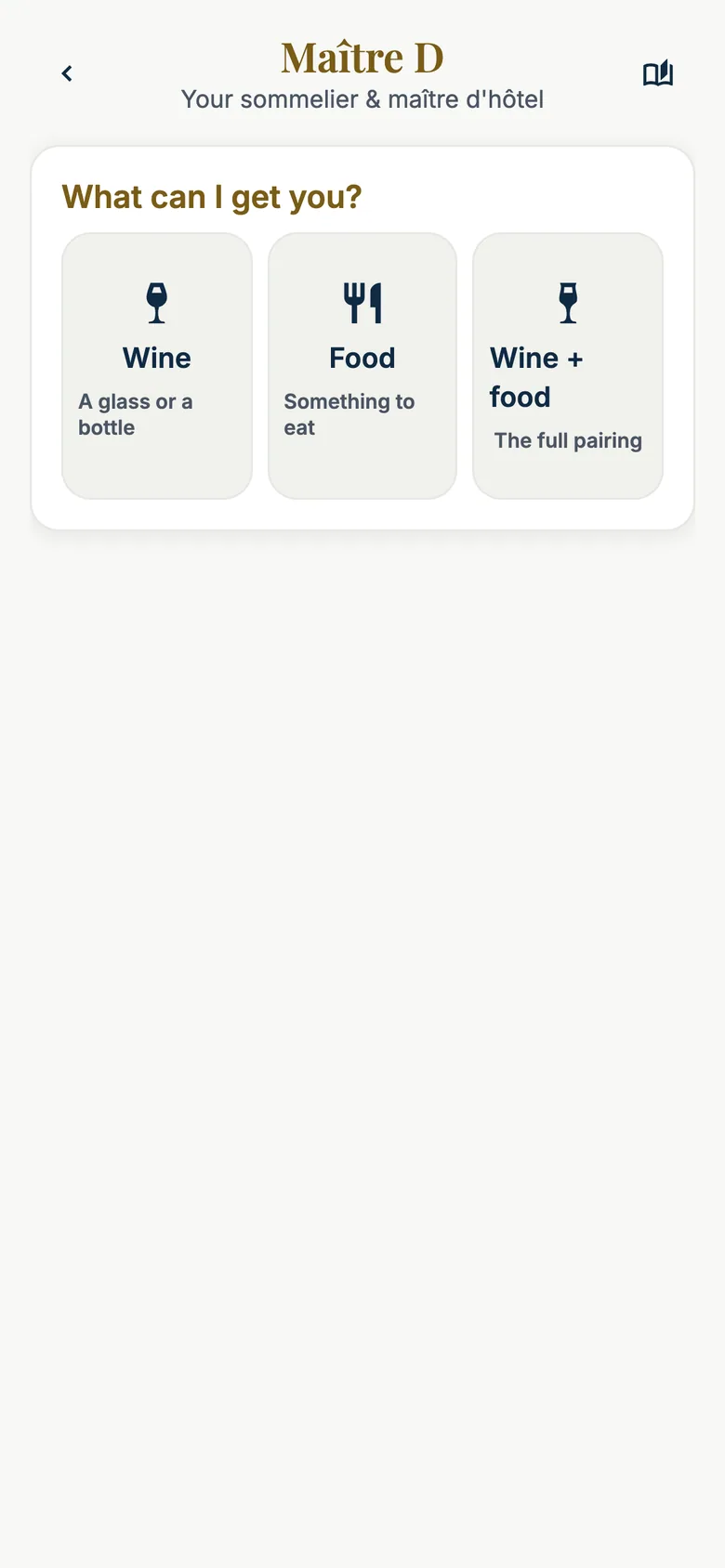
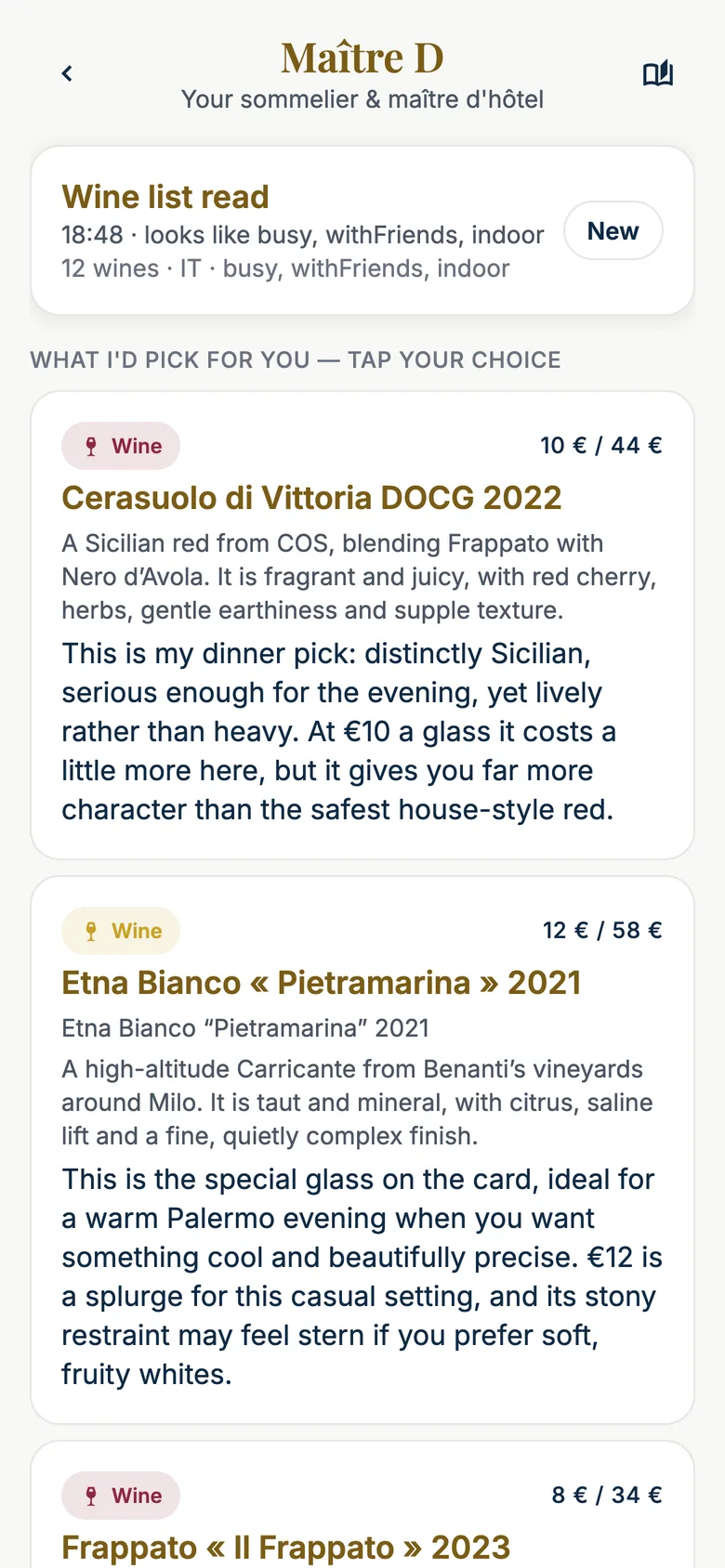
Wine, food, or the pairing. Maître D reads every line of the card, checks where you are, the weather and the hour, remembers what you liked last time, respects your budget — and tells you, like a friend, why you'll love it and why you might not.

iPhone screen of Maître D: 'What can I get you?' with three choices — Wine (a glass or a bottle, I pick from the wine list), Food (a dish, I pick from the menu), Wine + food (I pair them together).
Three doors: wine, food, the pairing.
iPhone screen of Maître D after reading a Sicilian wine list: a card 'Wine list read — 18:48 · looks like busy, with friends, indoor · 12 wines · IT' with a New button, then 'WHAT I'D PICK FOR YOU — TAP YOUR CHOICE': 'Cerasuolo di Vittoria DOCG 2022' (red Wine chip, 10 € / 44 €) with a description — a Sicilian red from COS blending Frappato with Nero d'Avola, fragrant and juicy — and the reason 'This is my dinner pick: distinctly Sicilian, serious enough for the evening, yet lively rather than heavy…'; 'Etna Bianco « Pietramarina » 2021' (12 € / 58 €), a high-altitude Carricante from Benanti, 'the special glass on the card, ideal for a warm Palermo evening… €12 is a splurge for this casual setting'; then 'Frappato « Il Frappato » 2023' (8 € / 34 €).
Named from the card, priced from the card, argued like a friend.
Explore

Find places the way you think about them

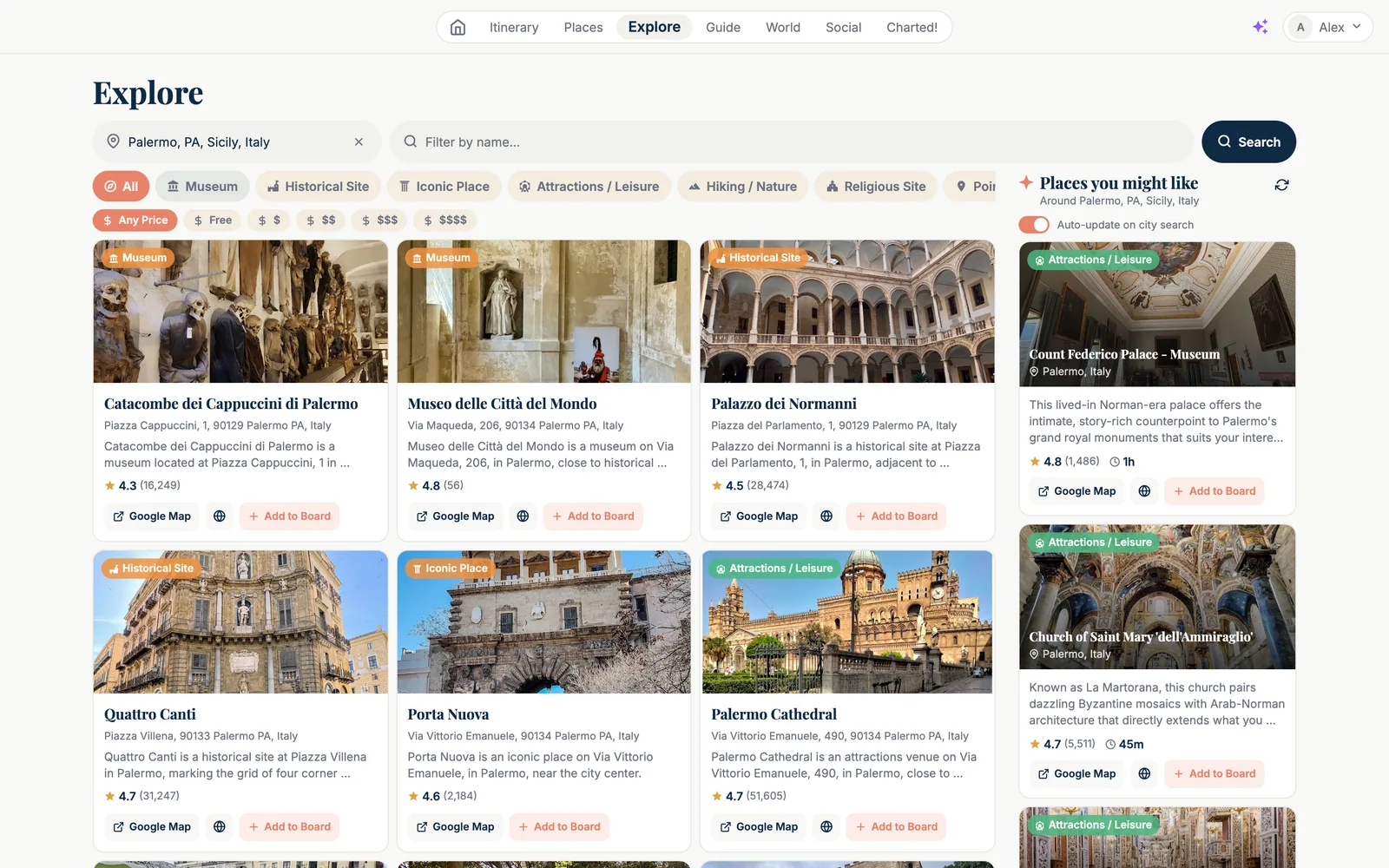
A search portal with categories and prices — and a band of places picked for you from your own trips, that follows the city you're looking at.

The Explore page on the web: a location field reading 'Palermo, PA, Sicily, Italy', a 'Filter by name' field and a Search button; chips All, Museum, Historical Site, Iconic Place, Attractions / Leisure, Hiking / Nature, Religious Site and price chips Any Price, Free, $ to $$$$; a grid of place cards with a photo, a category badge, the name, the address, a one-line description, the rating with the number of reviews and buttons 'Google Map' and 'Add to Board': Catacombe dei Cappuccini di Palermo (4.3, 16,249), Museo delle Città del Mondo (4.8), Palazzo dei Normanni (4.5, 28,474), Quattro Canti (4.7, 31,247), Porta Nuova (4.6), Palermo Cathedral (4.7, 51,605). On the right, the 'Places you might like — Around Palermo' band with an 'Auto-update on city search' switch and AI picks: Count Federico Palace – Museum (4.8, 1 h) and the Church of Saint Mary dell'Ammiraglio, La Martorana (4.7, 45 m), each with a photo and the reason it fits your trips.
Every card opens the Google card; every place can go to a board — or straight into a day.
Remember

Your travel history becomes badges — and a map you colour

Countries, cities, nights away, kilometres flown, driven and walked — computed from trips you actually took. Forty-five badges over four tiers. And a world map to mark where you've been, where you dream of, where you live.

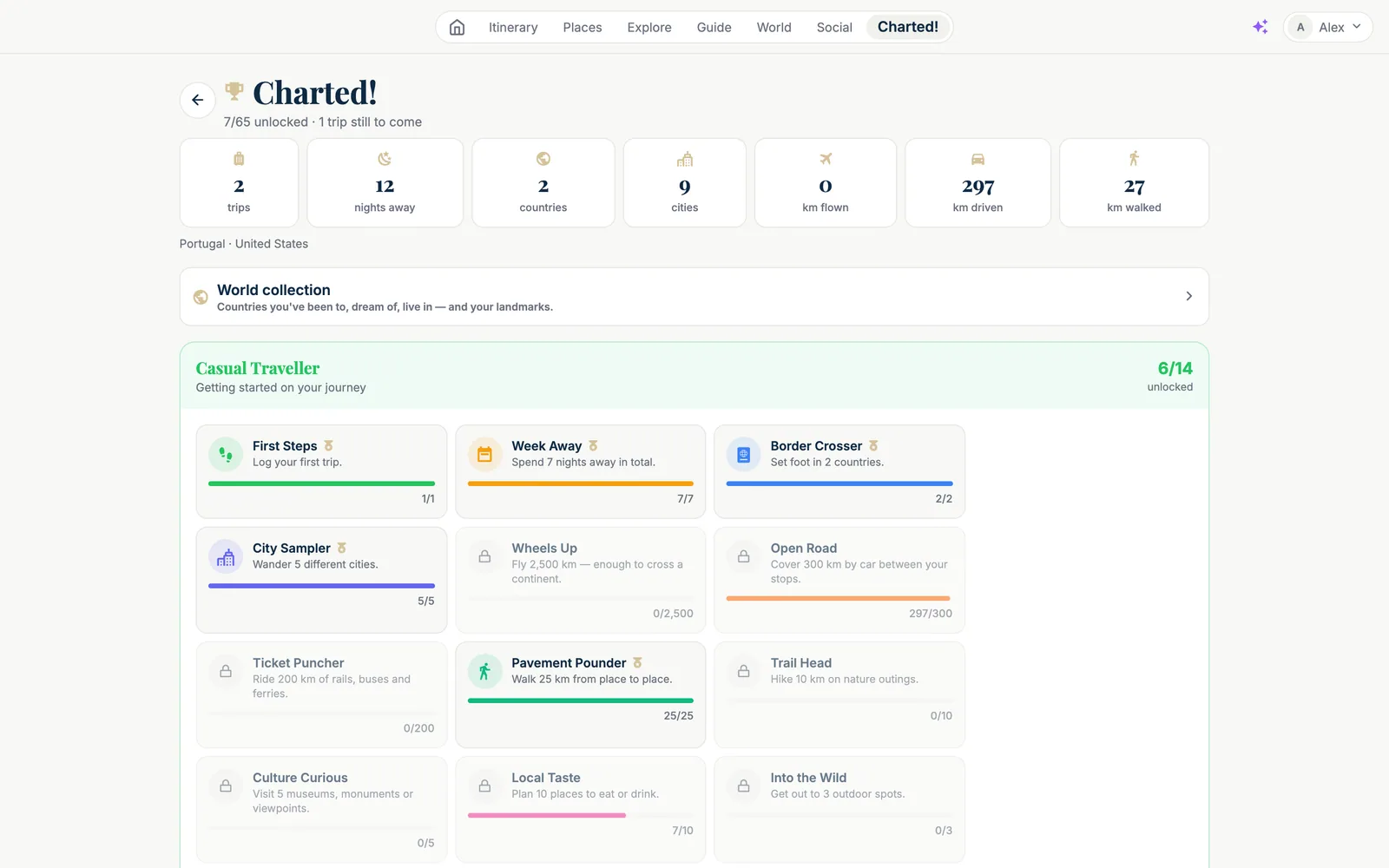
The Charted! screen: '7/65 unlocked · 1 trip still to come', seven tiles — 2 trips, 12 nights away, 2 countries, 9 cities, 0 km flown, 297 km driven, 27 km walked — the countries 'Portugal · United States', a 'World collection' link, and the 'Casual Traveller' tier (6/14 unlocked) with badges First Steps, Week Away, Border Crosser and City Sampler unlocked, Open Road at 297/300, Pavement Pounder 25/25, Local Taste 7/10 and locked badges such as Wheels Up, Ticket Puncher, Trail Head, Culture Curious, Into the Wild.
Badges only count trips that started. Planning unlocks nothing.
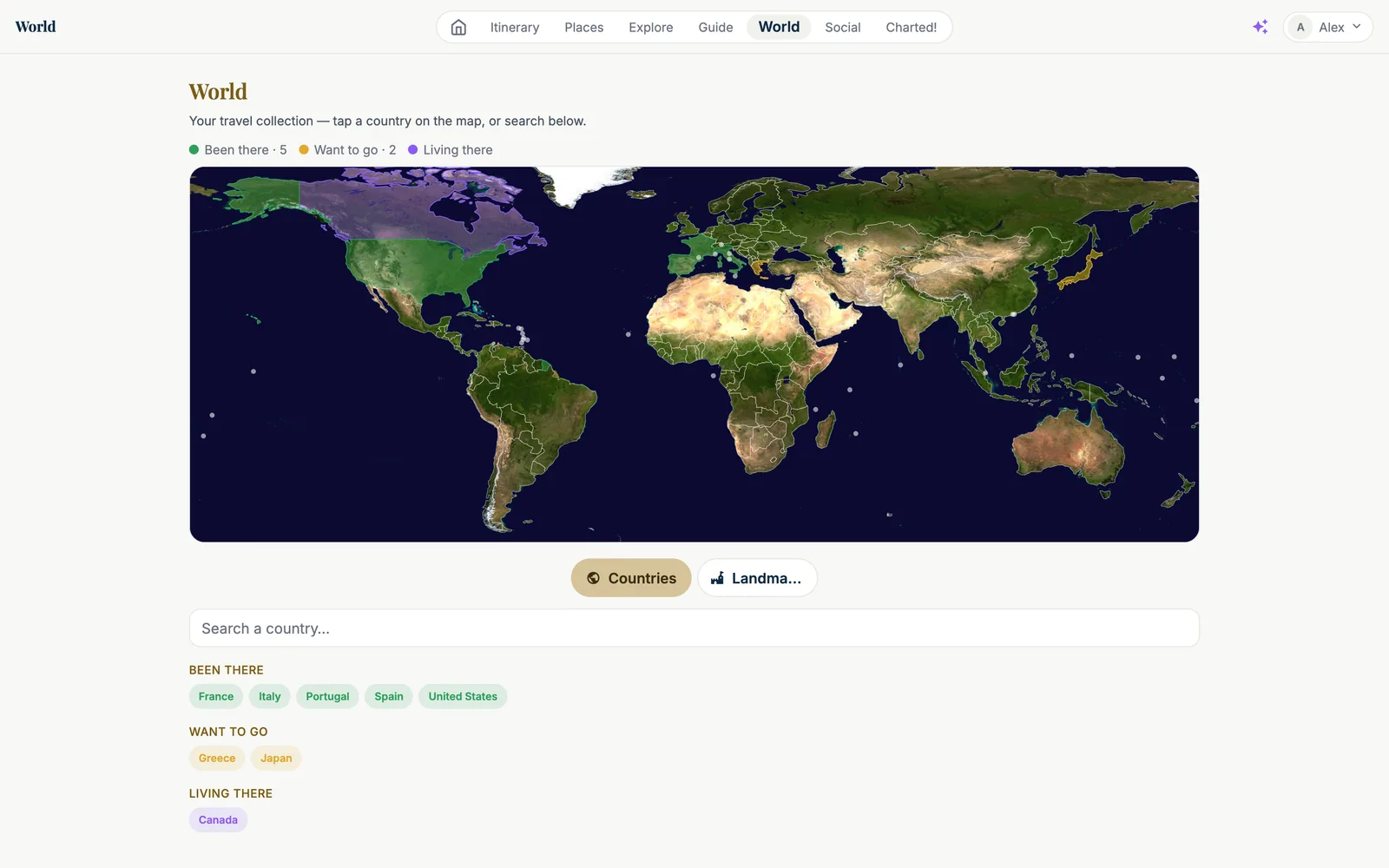
The World collection: a satellite world map with countries coloured — green for 'Been there' (France, Italy, Portugal, Spain, United States), gold for 'Want to go' (Greece, Japan), purple for 'Living there' (Canada) — with the legend 'Been there · 5, Want to go · 2, Living there', Countries / Landmarks tabs, a 'Search a country' field and the three lists of country chips.
Tap a country, choose a colour. Collect landmarks too.
Together

Share a trip, follow a traveler, borrow a plan

Sharing makes a clean copy: no notes, no documents, no confirmation numbers, home flights removed. Discover what others planned, follow them, and import their trip as your own — without dates, ready to schedule.

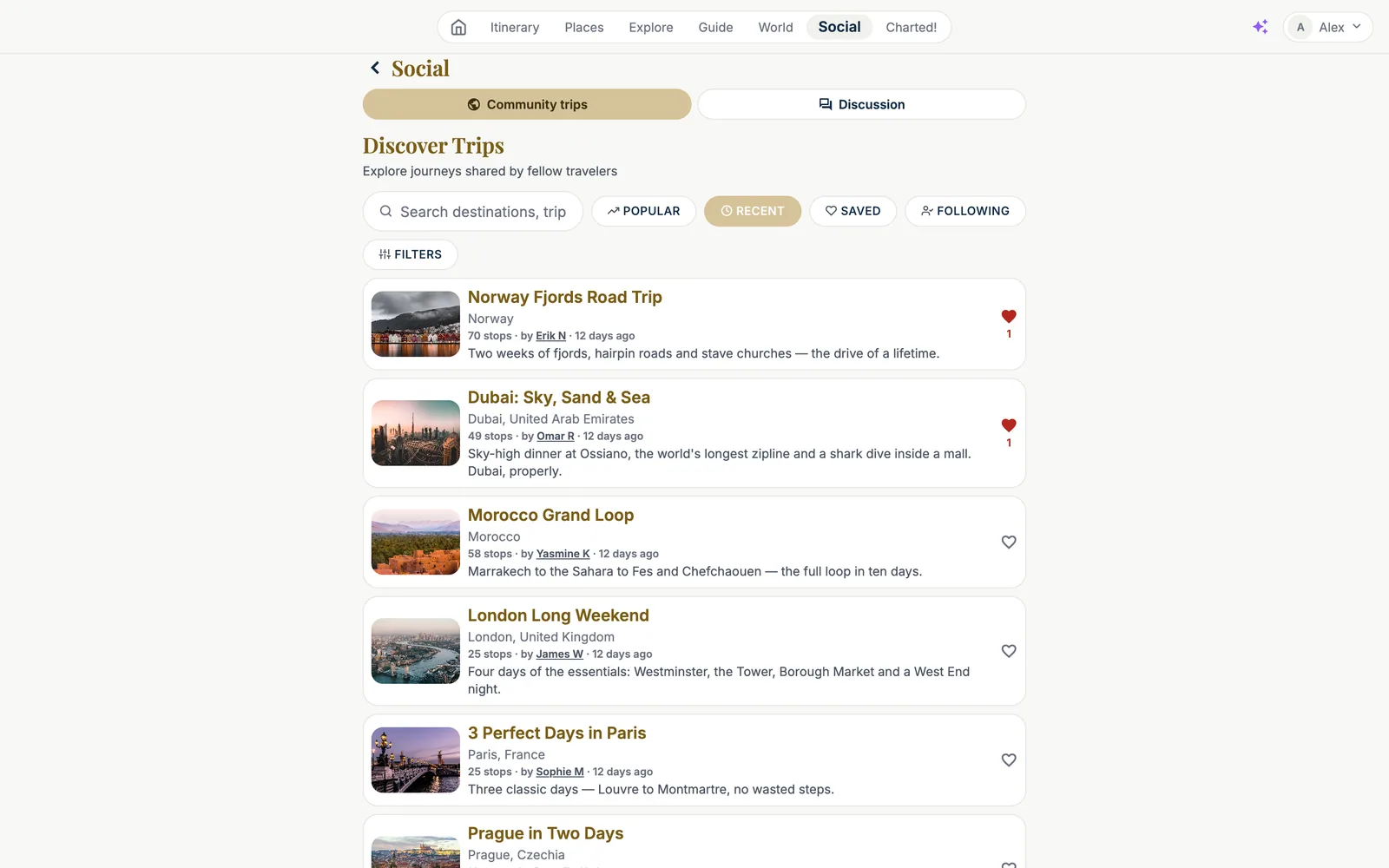
The Social page, 'Discover Trips — explore journeys shared by fellow travelers': a search field, sort chips Popular / Recent / Saved / Following and a Filters button; a list of community trips with a photo, the title, the destination, the number of stops, the author and a one-line description, and a heart with its count: Norway Fjords Road Trip (Norway, 70 stops, by Erik N, 'Two weeks of fjords, hairpin roads and stave churches'), Dubai: Sky, Sand & Sea (49 stops, by Omar R), Morocco Grand Loop (58 stops, by Yasmine K), London Long Weekend (25 stops, by James W), 3 Perfect Days in Paris (25 stops, by Sophie M), Prague in Two Days.
Community trips, with hearts, filters by continent, country, duration and activities.

Travel together

  • My Group — invite someone to one trip or to all your trips, read-only or editor. No account yet? They get an invitation with a QR code.
  • Everyone keeps the story — if the creator deletes a trip that already started, each companion keeps a copy.
  • Follow — a push and an email when someone you follow shares a new trip (each switchable).
  • A forum for trip questions, tips and ideas.
Yours

Ten canvases, dark or light, your units, your maps

Appearance lives on your account: light, dark or automatic, ten canvases from Cream to Starry, six accents. Celsius or Fahrenheit, kilometres or miles, Google or Apple Maps. Categories with your own icons. A visit pace per category. AI preferences in your own words.

The same day planner in dark mode on the Starry canvas: near-black navy panels with gold accents, the day strip and stop cards with their photos on the left, the light Google map of Palermo with the dotted route in the middle, the Add places panel on the right.
Dark mode, Starry canvas. The map stays readable.
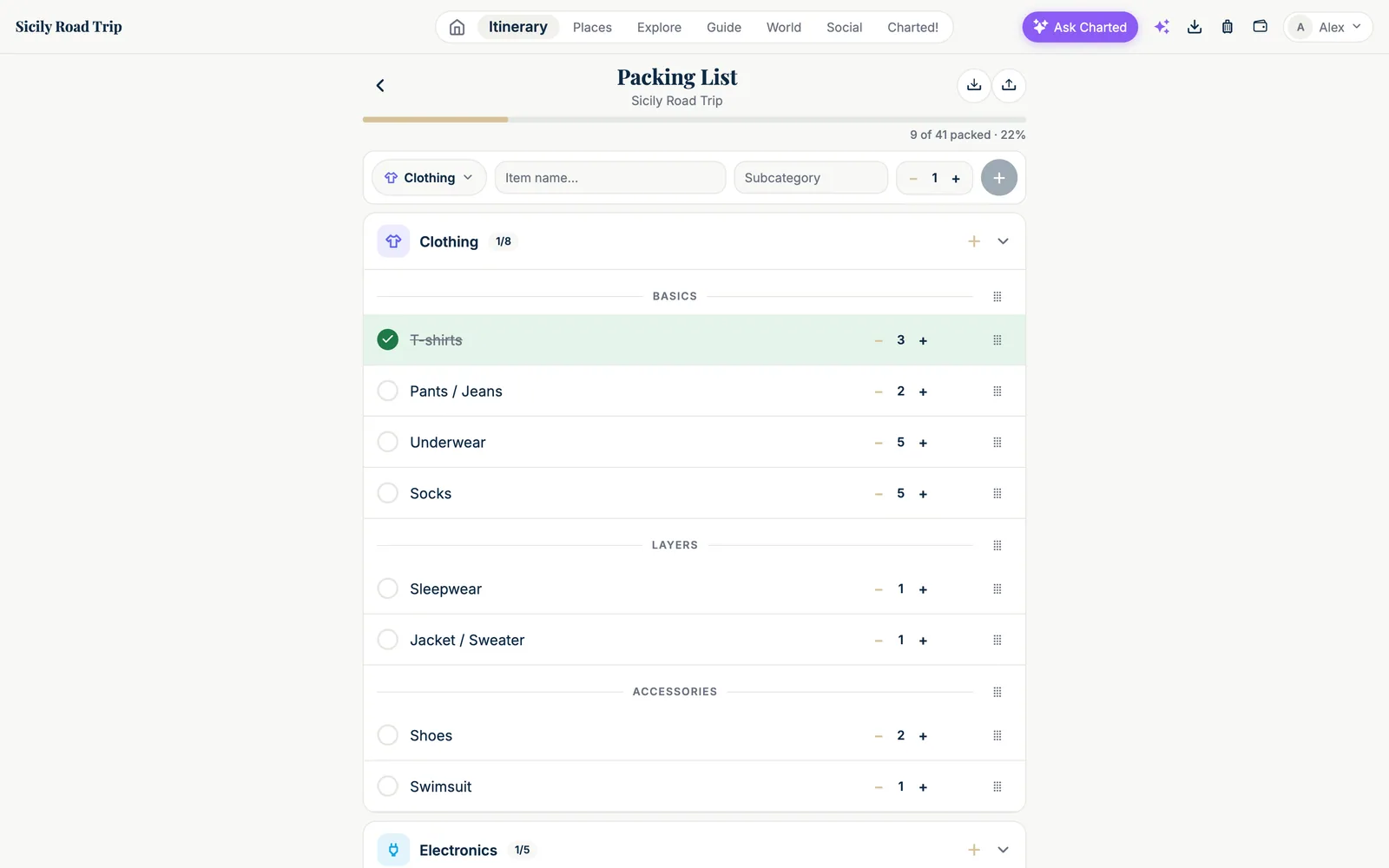
The Packing List for the Sicily Road Trip: a progress bar 'packed' with a percentage, a row to add an item (category Clothing, item name, subcategory, quantity), the Clothing category with subcategories BASICS (T-shirts ×3, Pants / Jeans ×2, Underwear ×5, Socks ×5), LAYERS (Sleepwear, Jacket / Sweater) and ACCESSORIES (Shoes ×2, Swimsuit), each row with a checkbox, quantity steppers and a drag handle, then the Electronics category.
Packing per person, with master lists you reuse from trip to trip.
Everything, one app

From the first idea to the last memory

Charted follows the whole journey — planning at home, living it on the ground, and keeping the story afterwards.

The app

Charted in your pocket

The iPhone app is in final testing and lands on the App Store with launch — voice guide, offline mode, flight alerts, the lock-screen flight card and the sommelier come along. Meanwhile, everything works on the web. Plans and the launch preview →

Use Charted on the web → Coming soon on theApp Store